For more advanced use EasyUEFI can be controlled from the Command Line, instead of using the graphical user interface. EasyUEFI Command Line owns comprehensive EFI/UEFI boot option management functions, such as create, delete, edit EFI/UEFI boot options, change EFI/UEFI boot sequence, etc.
Step 1. Run the Windows Command Prompt as administrator.
Step 2. Navigate to the bin folder under the installation directory of EasyUEFI by typing in:
cd C:\Program Files\Hasleo\EasyUEFI\bin  Tips: If you installed the program in a different location, enter that location instead.
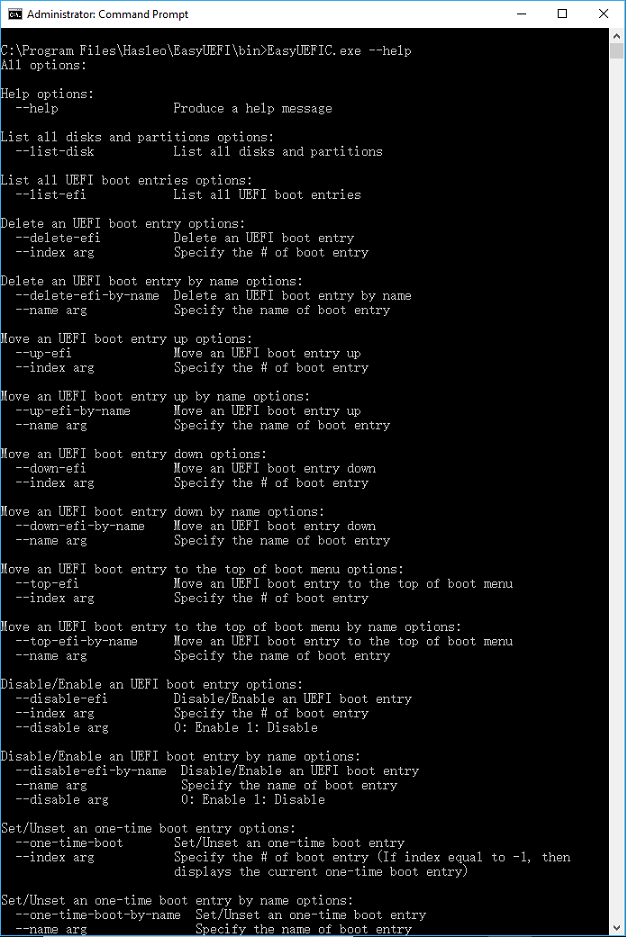
Step 3. Type "EasyUEFIC.exe --help" for help, all the command and parameters of this tool will be listed as below: