08-22-2026, 11:26 AM (This post was last modified: 08-22-2026, 11:28 AM by al3x.)
I think that answer is incredible helpful and it makes totally sense that the method was changed in the past. When it comes to huge backups or network connections, the old method would probably take a long time, so manually merging into a full backup occasionally if needed is way more efficient.
Yes indeed, that was a huge help @admin, thank you!
I see the logic behind prioritizing deletions over merges. It's certainly a faster way to do things and honestly, merging endlessly is a good way to ensure the whole chain gets corrupted if something goes wrong at some point (ask me how I know). I'm going to time how long a full backup takes of this system because I've been reading more recent versions of Hasleo are a fair bit quicker than Reflect 8.1 (which is where I'm coming from) and if so, I'll probably just set a policy where a Full is done, then 7 or 14 Incrementals, then a new Full which as you say, will reset the chain. Probably better for consistency. But now that I know the parameters, I'll play around and see what works best.
OK, so one final question for sanity check purposes.
I'm going to try a different method. I have a daily job setup now that's configured for Incremental but also to perform a full backup after 15 runs. I then set the retention to 1 Full backup and 14 Incremental backups.
My guess is that it will create a Full for the first backup as there's no Incrementals present, then take 14 Incrementals in subsequent runs, then the next run should be a fresh Full, which will then delete the old chain and start fresh and continue in that chain loop.
(08-22-2026, 07:19 PM)Parallax Abstraction Wrote: OK, so one final question for sanity check purposes.
I'm going to try a different method. I have a daily job setup now that's configured for Incremental but also to perform a full backup after 15 runs. I then set the retention to 1 Full backup and 14 Incremental backups.
My guess is that it will create a Full for the first backup as there's no Incrementals present, then take 14 Incrementals in subsequent runs, then the next run should be a fresh Full, which will then delete the old chain and start fresh and continue in that chain loop.
Do I have that right?
Cheers!
That should work but would mean that there is no backup prior to the current one. If some problem was uncovered with the current system you would not be able to go back to a point just before the recent backup.
08-22-2026, 08:42 PM (This post was last modified: 08-22-2026, 08:44 PM by al3x.)
Your specific setting would do this:
- 14 inc. backups are kept, so the 15th backup would merge the oldest two inc. backups into 1, leaving you with again 14 inc. backups.
- After 15 inc. backups a new full backup would be performed. But as there are only 14 now, another inc. backup will be performed and the oldest two inc. backups will be merged again, leaving you again with 14 inc. backups.
- So there will never be a new full backup.
What you need to do to make your config work:
- Set your retention policy for inc. backups to at least 15 or reduce the full backup setting to 14.
- Alternatively: You only want 1 full backup anyway, so you can disable the retention policy for inc. backups completely. Just leave the 1 full backup retention activated.
Btw, as your backup is huge: Keep in mind, that the new full backup must complete first. Only then the old full backup will be deleted. That leaves you with 2x 8TB of space that is temporarily needed.
Sorry, but I still don't quite understand the logic behind the retention policy.
If I don't want to merge any backups at all
just a full backup, followed by 5 incremental backups, and then another full backup
How can I configure that?
(10-10-2026, 10:02 AM)N8AKTIV Wrote: Sorry, but I still don't quite understand the logic behind the retention policy.
If I don't want to merge any backups at all
just a full backup, followed by 5 incremental backups, and then another full backup
How can I configure that?
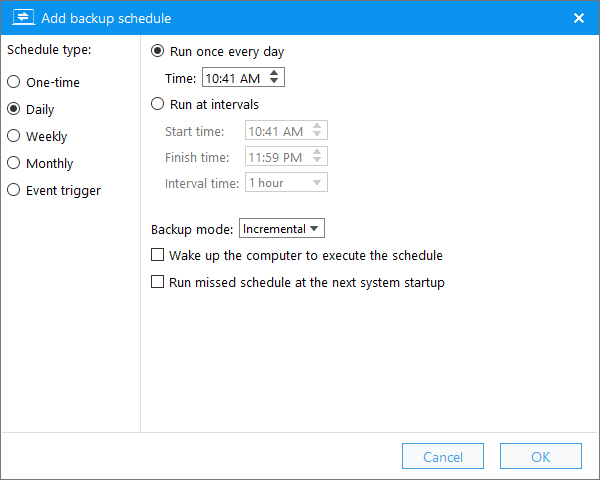
Hasleo Backup Suite provides a "Perform a full backup after a specified number of backups" option, which should be what you're looking for. Please refer to the screenshot below:
... yes, but this is only available when scheduling and not when manually starting the backup and this will not delete any old backups.
What I would like is 1 full backup followed by 5 incremental backups,
then a new full backup, followed by the deletion of the entire old backup chain, and then the 5 incremental backups again, ...
No backups should be merged, only one backup chain should be retained, and no old backups should be kept.
Unfortunately the next backup action can only be defined through a schedule.
So if you don't want to set up a schedule, you'd have to manually select a full backup after 5 incremental runs by choosing "Full" from the menu:
If you back up to a USB drive, you could also choose this event trigger instead: "USB drive plugged in".
That would automatically trigger your backup whenever you plug in your USB drive and you'd have the option of choosing your schedule.
To automatically delete the last full image chain, you can set the retention policy to only keep 1 full backup:
That should work and whenever you finish a new full backup, the old chain will be deleted with all its incremental or differental images.