Thread Rating:
  • 4 Vote(s) - 5 Average
  • 1
  • 2
  • 3
  • 4
  • 5
Feature REQUESTS
#21
(01-28-2026, 04:15 PM)richlux Wrote:
(01-28-2026, 02:30 AM)admin Wrote: Please note that the image retention policy of HBS applies to both manually and automatically executed backups. If manual execution of backup schedules is allowed and the next schedule has been executed manually, should that schedule still be executed when its originally scheduled time arrives?

I think that the next scheduled backup should run when the time arises.  By running it manually, it's not skipping the next scheduled backup, just running it an additional earlier time.

Rich

Another question is how to present this feature in the user interface. We definitely don't want the interface to end up as cluttered as Macrium Reflect's.

Reply
#22
(01-29-2026, 02:40 AM)admin Wrote: Another question is how to present this feature in the user interface. We definitely don't want the interface to end up as cluttered as Macrium Reflect's.

I recommend one of these options below:

1) Change the backup button to allow the type to be picked as shown in the screenshot below. This would be my preference because I'm always manually creating backups of various types.  If you do this, you can remove "Backup" from the Actions button since it would be redundant.
2) Keep the backup button how it is now, but allow a new "Next Scheduled" type when setting the default behavior for the button.  If you keep a default backup button, can you also add hover text on the button to show what type of backup is going to be run when clicked? I can never remember what type I set it to.

[Image: backup.jpg]

FWIW, Acronis has a "Backup Now" button that always manually runs the next scheduled backup.

Rich
Reply
#23
(01-29-2026, 08:38 PM)richlux Wrote:
(01-29-2026, 02:40 AM)admin Wrote: Another question is how to present this feature in the user interface. We definitely don't want the interface to end up as cluttered as Macrium Reflect's.

I recommend one of these options below:

1) Change the backup button to allow the type to be picked as shown in the screenshot below. This would be my preference because I'm always manually creating backups of various types.  If you do this, you can remove "Backup" from the Actions button since it would be redundant.
2) Keep the backup button how it is now, but allow a new "Next Scheduled" type when setting the default behavior for the button.  If you keep a default backup button, can you also add hover text on the button to show what type of backup is going to be run when clicked? I can never remember what type I set it to.

Option 1 wouldn't work because of the option "Default behavior of the "Backup" button" in advanced settings. I think that should stay because it's an easy way to always force a full backup with a single click. I think there's some people who don't want to think about what type of backup they want to run next.

What about this instead? You place a little icon next to the pause/resume button which will trigger the next scheduled update.
Maybe like this:

[Image: JsYw5Vdf_o.png]

Also just an idea. Icon might not be the best to say "run scheduled backup" but I wasn't creative enough Big Grin
Reply
#24
(01-29-2026, 10:04 PM)al3x Wrote: What about this instead? You place a little icon next to the pause/resume button which will trigger the next scheduled update.
Maybe like this:

[Image: JsYw5Vdf_o.png]

Also just an idea. Icon might not be the best to say "run scheduled backup" but I wasn't creative enough Big Grin

Thanks for the suggestion, al3x. That's a great idea.
Reply
#25
(01-13-2026, 11:09 AM)admin Wrote:
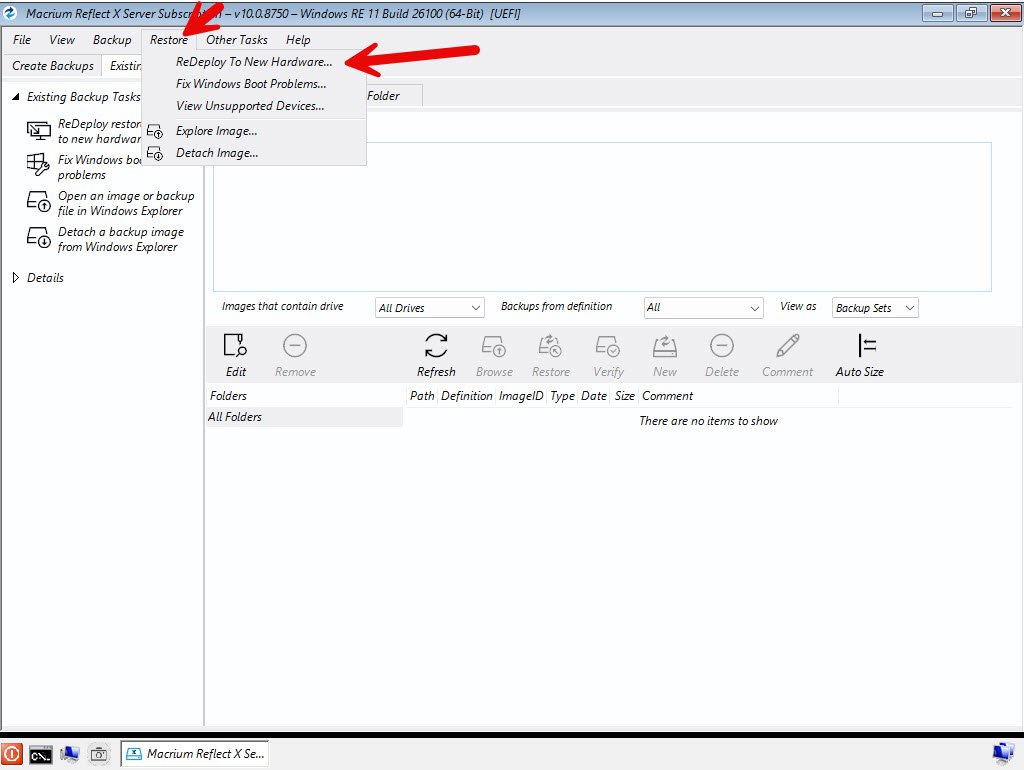
(01-13-2026, 10:36 AM)Manadalorian Wrote: Macrium has this feature available when booting a WinPE image:
[Image: 2026-01-13_12-19-40.jpg]
And if I forget to select "Move to new hardware," I don't have to restart the image restore; I can simply go to the menu and reset the hardware identifiers.

Thank you for providing the information. I will pass your suggestion on to my development team.

Hello. These suggestions haven't been implemented in the new version of the program. Should we expect them in the next version?
Reply
#26
(02-02-2026, 11:45 AM)Manadalorian Wrote:
(01-13-2026, 11:09 AM)admin Wrote: Thank you for providing the information. I will pass your suggestion on to my development team.

Hello. These suggestions haven't been implemented in the new version of the program. Should we expect them in the next version?

Thank you for your suggestion! We're a small team, and we take every idea we receive into serious consideration. However, due to the volume of suggestions we receive, we need to prioritize and schedule them comprehensively. Therefore, we cannot guarantee that every feature will be implemented quickly. Thank you for your understanding.
Reply
#27
I run windows 11 as a SUA. I can't remember I ever saw an "A new Hasleo update is available" when I not actively opened Hasleo by hand and checked myself for one. Am I just unlucky and should have waited longer or is there no real automatic checking for updates like Firefox does (which can be updated without using admin credentials then).
Tldr.
@admin I would suggest a update mechanic like firefox as an option.
Reply
#28
(02-10-2026, 08:20 AM)Geri123 Wrote: I run windows 11 as a SUA. I can't remember I ever saw an "A new Hasleo update is available" when I not actively opened Hasleo by hand and checked myself for one. Am I just unlucky and should have waited longer or is there no real automatic checking for updates like Firefox does (which can be updated without using admin credentials then).
Tldr.
@admin I would suggest a update mechanic like firefox as an option.

Please open the "Backup Suite.ini" file located in the bin folder within the installation directory and verify that the value for AutoCheckUpdate is set to 1. The update check feature does need improvement, but we currently lack the time to implement it.
Reply
#29
(02-10-2026, 09:44 AM)admin Wrote: Please open the "Backup Suite.ini" file located in the bin folder within the installation directory and verify that the value for AutoCheckUpdate is set to 1. The update check feature does need improvement, but we currently lack the time to implement it.
It is on "1". The reason I mentioned it is because without a better notification some people will never know they lag behind in updates. I check for updates on my own but others don't (e.g. two I help with pc stuff).
Thanks for your answer and have a nice day Smile
Reply
#30
(02-10-2026, 10:04 AM)Geri123 Wrote:
(02-10-2026, 09:44 AM)admin Wrote: Please open the "Backup Suite.ini" file located in the bin folder within the installation directory and verify that the value for AutoCheckUpdate is set to 1. The update check feature does need improvement, but we currently lack the time to implement it.
It is on "1". The reason I mentioned it is because without a better notification some people will never know they lag behind in updates. I check for updates on my own but others don't (e.g. two I help with pc stuff).
Thanks for your answer and have a nice day Smile

You hit the nail on the head! Many features still need refinement, but that takes time. Thank you again for your valuable feedback, and I wish you all the best!
Reply


Forum Jump:


Users browsing this thread: 36 Guest(s)