Posts: 544
Threads: 42
Joined: Dec 2022
Reputation:
56
12-02-2022, 01:38 AM
(This post was last modified: 10-07-2026, 11:23 PM by al3x.
Edit Reason: Post recreated as feature request intro
)
Feature REQUESTS thread
Do you want to help with the development of Hasleo Backup Suite?
Have an idea for an improvement or a request for a new feature?
👉 Please feel free to share your idea in this thread!
---
Archived posts
Older posts will periodically be moved to their own archive thread to keep this thread at a reasonable size, nothing is deleted.
Archived threads so far:
- [Archived] Feature REQUESTS 2025
- [Archived] Feature REQUESTS 2024
- [Archived] Feature REQUESTS 2023
- [Archived] Feature REQUESTS 2022
Posts: 217
Threads: 13
Joined: Dec 2023
Reputation:
14
Can you include the ability for HBS to reset the baseline full image that incremental and differential images are made? Right now I'm not sure which image HBS is using as its baseline, and both manual and auto-created full images use the same naming convention. It would be nice to be able to tell HBS to use image X as a means by which incremental and differential images are made in case the user makes manual changes and doesn't want to merge/delete images.
Posts: 80
Threads: 4
Joined: Mar 2024
Reputation:
4
(01-05-2026, 05:18 AM)n8chavez Wrote: Can you include the ability for HBS to reset the baseline full image that incremental and differential images are made? Right now I'm not sure which image HBS is using as its baseline, and both manual and auto-created full images use the same naming convention. It would be nice to be able to tell HBS to use image X as a means by which incremental and differential images are made in case the user makes manual changes and doesn't want to merge/delete images.
Automatic and manual backups created within a single task must form a continuous chain, otherwise the backup loses its meaning. If you want to have a special chain of manual backups that is not subject to consolidation and is not linked to automatic backups, create a separate task for manual backups only, which you can call “System Backup Manual only...”. Using a description for each backup will help you navigate through the multitude of backups more easily.
It seems that your suggestion does not have a rational basis.
Posts: 217
Threads: 13
Joined: Dec 2023
Reputation:
14
01-05-2026, 06:00 PM
(This post was last modified: 01-06-2026, 02:10 AM by admin.)
(01-05-2026, 09:15 AM)aldist Wrote: (01-05-2026, 05:18 AM)n8chavez Wrote: Can you include the ability for HBS to reset the baseline full image that incremental and differential images are made? Right now I'm not sure which image HBS is using as its baseline, and both manual and auto-created full images use the same naming convention. It would be nice to be able to tell HBS to use image X as a means by which incremental and differential images are made in case the user makes manual changes and doesn't want to merge/delete images.
Automatic and manual backups created within a single task must form a continuous chain, otherwise the backup loses its meaning. If you want to have a special chain of manual backups that is not subject to consolidation and is not linked to automatic backups, create a separate task for manual backups only, which you can call “System Backup Manual only...”. Using a description for each backup will help you navigate through the multitude of backups more easily.
It seems that your suggestion does not have a rational basis.
I'm making daily differential images based on a full image I created in 11/2025. Awesome. Great. Now it's 1/2026 I've I've undergone massive intentional system changes. I have two options, oh wait. No, I only have the one option; to continue differential images based on the now-outdated full images.
Since we know that that latter differential images are based on the former, users would typically have to delete an images in order to reset the baseline. In this case, I'm asking to not have to to that. Rather, to tell HBS to use this full images from now on disregarding the others before it. That way I won't have to delete the previous images. Condescending tones from aldist aside, this request is not without precedence. Reflect has such a feature. It's called "Reset Differential Backups", and exists in the backup's definition file. I used it many many times. Yes, users are able to have multiple branches.
Posts: 3,679
Threads: 86
Joined: Feb 2014
Reputation:
372
(01-05-2026, 06:00 PM)n8chavez Wrote: (01-05-2026, 09:15 AM)aldist Wrote: Automatic and manual backups created within a single task must form a continuous chain, otherwise the backup loses its meaning. If you want to have a special chain of manual backups that is not subject to consolidation and is not linked to automatic backups, create a separate task for manual backups only, which you can call “System Backup Manual only...”. Using a description for each backup will help you navigate through the multitude of backups more easily.
It seems that your suggestion does not have a rational basis.
I'm making daily differential images based on a full image I created in 11/2025. Awesome. Great. Now it's 1/2026 I've I've undergone massive intentional system changes. I have two options, oh wait. No, I only have the one option; to continue differential images based on the now-outdated full images.
Since we know that that latter differential images are based on the former, users would typically have to delete an images in order to reset the baseline. In this case, I'm asking to not have to to that. Rather, to tell HBS to use this full images from now on disregarding the others before it. That way I won't have to delete the previous images. Condescending tones from aldist aside, this request is not without precedence. Reflect has such a feature. It's called "Reset Differential Backups", and exists in the backup's definition file. I used it many many times. Yes, users are able to have multiple branches.
Regarding Hasleo Backup Suite, its backup logic is clear and fixed: incremental backups are always based on the last existing backup image (whether incremental, differential, or full), while differential backups are always based on the last existing full backup image.
Introducing "multiple baselines" or allowing arbitrary switching of the baseline would fundamentally alter the program's core architecture and introduce significant complexity. This is not merely an interface change but would require a redesign of the underlying task scheduling, storage management, and recovery engine.
Concerning the "Reset Differential Backups" feature you mentioned in Reflect, to accurately understand and evaluate its relevance for Hasleo Backup Suite, could you please provide more specific guidance? For example:
1. The exact location of this feature in Reflect's user interface (e.g., which step in the backup definition wizard, or which option in the context menu).
2. The relevant section name or link in the official documentation describing this feature.
With this concrete information, we can perform an informed analysis of its implementation mechanism. This will enable us to have a focused and fruitful discussion on its technical feasibility, ensuring our dialogue remains constructive and grounded in the same technical context.
Finally, I'd like to remind everyone to maintain courteous language and refrain from personal attacks or accusations in our discussions. Everyone participating here is a friend of Hasleo who cares about HBS. Our shared is to see it improve, not to target any individual. We should proceed with this mutual understanding.
Posts: 3
Threads: 0
Joined: Jan 2026
Reputation:
1
Dear developers, I don't know if this question has been raised before. Is it possible to move the option to restore a previously created system image to "different hardware" into a SEPARATE module, as is done in Macrium (ReDeploy) and Acronis (Acronis Universal Restore)? In some scenarios, this would be much more convenient. For example, during a restore, I simply forgot to specify that I have new hardware (motherboard), and I'll have to waste time restoring with this option enabled. Or I simply want to connect the system drive to another computer with different hardware without restoring from an image. Macrium and Acronis implement this as a separate module in the programs, and it's very convenient. If I'm wrong about anything, please correct me.
Posts: 3,679
Threads: 86
Joined: Feb 2014
Reputation:
372
(01-11-2026, 10:16 AM)Manadalorian Wrote: Dear developers, I don't know if this question has been raised before. Is it possible to move the option to restore a previously created system image to "different hardware" into a SEPARATE module, as is done in Macrium (ReDeploy) and Acronis (Acronis Universal Restore)? In some scenarios, this would be much more convenient. For example, during a restore, I simply forgot to specify that I have new hardware (motherboard), and I'll have to waste time restoring with this option enabled. Or I simply want to connect the system drive to another computer with different hardware without restoring from an image. Macrium and Acronis implement this as a separate module in the programs, and it's very convenient. If I'm wrong about anything, please correct me.
I couldn't find the ReDeploy feature you mentioned in Macrium, it may have been removed. Even if such a feature were available, you might still forget to use it during restoration, just like forgetting to select the "Universal Restore" option, and end up performing a standard restore instead.
Posts: 14
Threads: 0
Joined: Jun 2025
Reputation:
0
Posts: 3
Threads: 0
Joined: Jan 2026
Reputation:
1
(01-13-2026, 07:00 AM)admin Wrote: (01-11-2026, 10:16 AM)Manadalorian Wrote: Dear developers, I don't know if this question has been raised before. Is it possible to move the option to restore a previously created system image to "different hardware" into a SEPARATE module, as is done in Macrium (ReDeploy) and Acronis (Acronis Universal Restore)? In some scenarios, this would be much more convenient. For example, during a restore, I simply forgot to specify that I have new hardware (motherboard), and I'll have to waste time restoring with this option enabled. Or I simply want to connect the system drive to another computer with different hardware without restoring from an image. Macrium and Acronis implement this as a separate module in the programs, and it's very convenient. If I'm wrong about anything, please correct me.
I couldn't find the ReDeploy feature you mentioned in Macrium, it may have been removed. Even if such a feature were available, you might still forget to use it during restoration, just like forgetting to select the "Universal Restore" option, and end up performing a standard restore instead.
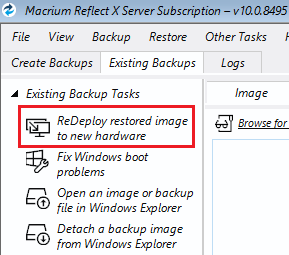
Macrium has this feature available when booting a WinPE image:
![[Image: 2026-01-13_12-19-40.jpg]](https://www.upload.ee/thumb/18978071/2026-01-13_12-19-40.jpg)
And if I forget to select "Move to new hardware," I don't have to restart the image restore; I can simply go to the menu and reset the hardware identifiers.
Posts: 3,679
Threads: 86
Joined: Feb 2014
Reputation:
372
(01-13-2026, 10:36 AM)Manadalorian Wrote: (01-13-2026, 07:00 AM)admin Wrote: I couldn't find the ReDeploy feature you mentioned in Macrium, it may have been removed. Even if such a feature were available, you might still forget to use it during restoration, just like forgetting to select the "Universal Restore" option, and end up performing a standard restore instead.
Macrium has this feature available when booting a WinPE image:
And if I forget to select "Move to new hardware," I don't have to restart the image restore; I can simply go to the menu and reset the hardware identifiers.
Thank you for providing the information. I will pass your suggestion on to my development team.
|









![[Image: 2026-01-13_12-19-40.jpg]](https://www.upload.ee/image/18978071/2026-01-13_12-19-40.jpg)