Thread Rating:
  • 0 Vote(s) - 0 Average
  • 1
  • 2
  • 3
  • 4
  • 5
Exclude directories recursive
#1
I'm evaluating Hasleo Backup Suite and would like to exclude all Python generated venv\ and build\ directories recursively from the backup root directory. This saves a large amount of backup storage. How can I do this?

Thanks!
Reply
#2
Hi and welcome to the forum!

The free version doesn't support custom exclusion filters. Starting with the Home edition you can define your own exclusion filters in the options:

[Image: VGIGQDYq_t.png]

This is also explained in the online documentation here:
https://www.easyuefi.com/backup-software...tions.html

Unfortunately there's no way to exclude dynamic folders (with wildcard) yet. Wildcards are supported in filenames only.

So you currently have these 3 options:
  • Add all the "venv\" and "build\" folders of all projects manually -> option "Folder path"
  • Exclude filenames that match your criteria (if that's possible) -> option "File name"
  • Exclude filenames that match your criteria (if that's possible) and also give a folder path as a starting point -> option "Folder path + File name" with [x] Recursive subfolders

Maybe dynamic folders / wildcards for folders would be a good feature addition for future HBS versions?
Reply
#3
@al3x,

Thank you for your detailed reply.

The number annotations on your screenshots look really great. Could you tell me which screenshot software you are using? I'd like to get one as well.

Have a nice day!

Best regards,
Reply
#4
(06-24-2026, 10:56 AM)admin Wrote: The number annotations on your screenshots look really great. Could you tell me which screenshot software you are using? I'd like to get one as well.

Hi,

Sure, I’m using Greenshot:
https://getgreenshot.org

There might be better alternatives but that’s one of the simplest ones I’ve seen so far and it’s also free for commercial use and open source.
Reply
#5
(06-24-2026, 03:56 PM)al3x Wrote:
(06-24-2026, 10:56 AM)admin Wrote: The number annotations on your screenshots look really great. Could you tell me which screenshot software you are using? I'd like to get one as well.

Hi,

Sure, I’m using Greenshot:
https://getgreenshot.org

There might be better alternatives but that’s one of the simplest ones I’ve seen so far and it’s also free for commercial use and open source.

Thank you very much. What tool do you use to annotate screenshots with numbers and arrows?
Reply
#6
Thanks for your fast reply. 

> You can create custom backup filters to exclude files and folders by specifying a path and file name, the file name supports wildcards, allowed wildcards are: * and ?.

I was on the edge of purchasing multi professional licenses, but discovered late that directory exclusion is only supported by selecting individual directories per backup job, even in professional edition. It is undoable to exclude each individual directory for generated output directories with a fixed directory name.

The documentation is unclear as "directories does not support wildcards" is missing. This is a major missing feature as backup takes longer to create / restore and takes a large amount disk space.

I was impressed about the simple intuitive user interface, small memory, no subscription etc, but I will evaluate competitive products as well.
Reply
#7
(06-24-2026, 06:18 PM)Erretje Wrote: The documentation is unclear as "directories does not support wildcards" is missing. This is a major missing feature as backup takes longer to create / restore and takes a large amount disk space.

Well, it says "the file name supports wildcards, allowed wildcards are: * and ?.".
But it's still a little unclear, I give you that.

@admin: Do you think it would be possible to have a separate field for directory exclusion that also supports wildcard?

Or maybe it's easier if there's just a prefix like \ and/or / that makes this entry a directory exclusion.
Example: *.exe;\build;\*.old

In that example all *.exe files, all folders called build and all folders ending with .old would be excluded.

(06-24-2026, 05:07 PM)admin Wrote: Thank you very much. What tool do you use to annotate screenshots with numbers and arrows?

It's the same tool Big Grin .
You take your screenshot and then you can open it in its editor and draw around, enter text etc.
Reply
#8
@admin,

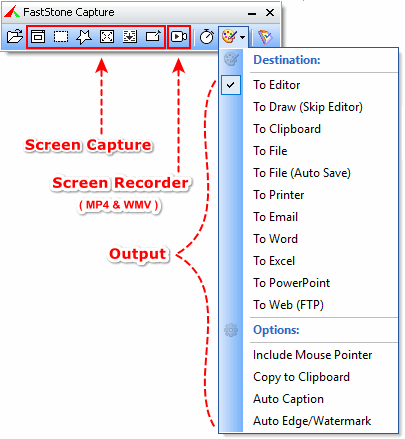
There is a Canadian Company that makes a product called "FastStone Capture".  It does everything you want too, but it is not free.  That is what I use.  They also make a free image viewer, that is free, and you can do text boxes and arrows, and other stuff, but the nice circles with numbers (steps) are not available in that product.

It is always nice to have options ...

Have a great day.

Regards,
Phil
Reply
#9
(06-25-2026, 02:43 AM)al3x Wrote:
(06-24-2026, 06:18 PM)Erretje Wrote: The documentation is unclear as "directories does not support wildcards" is missing. This is a major missing feature as backup takes longer to create / restore and takes a large amount disk space.

Well, it says "the file name supports wildcards, allowed wildcards are: * and ?.".
But it's still a little unclear, I give you that.

@admin: Do you think it would be possible to have a separate field for directory exclusion that also supports wildcard?

Or maybe it's easier if there's just a prefix like \ and/or / that makes this entry a directory exclusion.
Example: *.exe;\build;\*.old

In that example all *.exe files, all folders called build and all folders ending with .old would be excluded.

(06-24-2026, 05:07 PM)admin Wrote: Thank you very much. What tool do you use to annotate screenshots with numbers and arrows?

It's the same tool Big Grin .
You take your screenshot and then you can open it in its editor and draw around, enter text etc.
Reply
#10
apologies to (sort of stealing) Erretje's thread but just needed to say thanks to @al3x
for mentioning the edit feature of Greenshot.
I've used Greenshot for years but never investigated the edit function
Now I have... it's so simple to use for documentation (check out the count feature)
It's a perfect app for my purposes as I create documentation for a local NPO.

JayDee

Reply


Forum Jump:


Users browsing this thread: 3 Guest(s)