

O Hasleo BitLocker Anywhere For Mac apresenta uma interface de linha de comando (CLI) que permite aos usuários executar operações sem abrir a interface gráfica do usuário (GUI). Você pode emitir comandos a partir do Terminal ou por meio de scripts.
Observação: a Interface de Linha de Comando (CLI) não está disponível na Edição Professional. Para usar a CLI, entre em contato conosco para adquirir a edição que oferece suporte a ela.
Como Usar a Interface de Linha de Comando (CLI) do BitLocker Anywhere For Mac
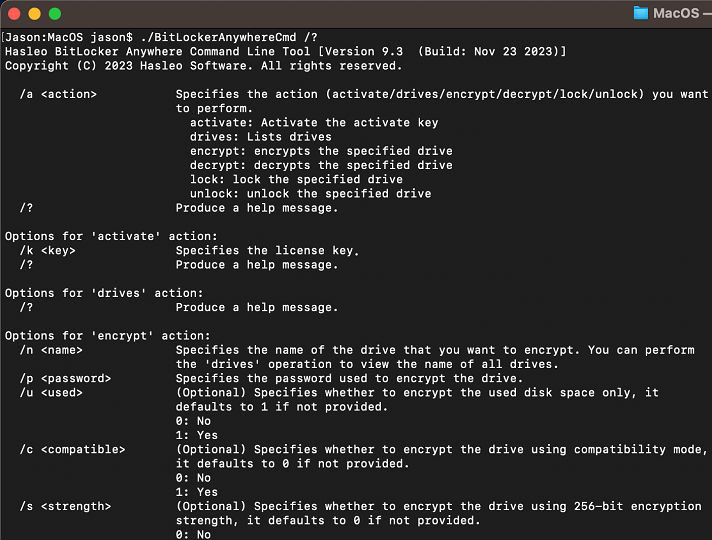
Hasleo BitLocker Anywhere Command Line Tool [Version 9.3 (Build: Nov 23 2023)]
Copyright (C) 2023 Hasleo Software. All rights reserved.

/a <action>
    Specifies the action (activate/drives/encrypt/decrypt/lock/unlock) you want to perform.
    activate: Activate the license key
    drives: Lists drives
    encrypt: encrypts the specified drive
    decrypt: decrypts the specified drive
    lock: lock the specified drive
    unlock: unlock the specified drive
/?
    Produce a help message.

Options for 'activate' action: (The machine code will be displayed if no options are specified.)
/n <key>
    Specifies the license key.
/c <code>
    Specifies the offline activation code.
/?
    Produce a help message.

Options for 'drives' action:
/?
    Produce a help message.

Options for 'encrypt' action:
/n <name>
    Specifies the name of the drive that you want to encrypt. You can perform the 'drives' operation to view the name of all drives.
/p <password>
    Specifies the password used to encrypt the drive.
/u <used>
    (Optional) Specifies whether to encrypt the used disk space only, it defaults to 0 if not provided.
    0: No
    1: Yes
/c <compatible>
    (Optional) Specifies whether to encrypt the drive using compatibility mode, it defaults to 0 if not provided.
    0: No
    1: Yes
/s <strength>
    (Optional) Specifies whether to encrypt the drive using 256-bit encryption strength, it defaults to 0 if not provided.
    0: No
    1: Yes
/r <recovery>
    (Optional) Specifies the path to save the BitLocker recovery key.
/i <silent>
    (Optional) Specifies the silent mode, it defaults to 0 if not provided.
    0: Non-silent mode
    1: Silent mode
/?
    Produce a help message.

Options for 'decrypt' action:
/n <name>
    Specifies the name of the drive that you want to decrypt. You can perform the 'drives' operation to view the name of all drives.
/p <password>
    (Optional) Specifies the password used to decrypt the drive. You cannot specify /p and /r at the same time.
/r <recovery>
    (Optional) Specifies the BitLocker recovery key used to decrypt the drive. You cannot specify /p and /r at the same time.
/u <used>
    (Optional) Specifies whether to decrypt the used disk space only, it defaults to 1 if not provided.
    0: No
    1: Yes
/i <silent>
    (Optional) Specifies the silent mode, it defaults to 0 if not provided.
    0: Non-silent mode
    1: Silent mode
/?
    Produce a help message.

Options for 'lock' action:
/n <name>
    Specifies the name of the drive that you want to lock. You can perform the 'drives' operation to view the name of all drives.
/s <silent>
    (Optional) Specifies the silent mode, it defaults to 0 if not provided.
    0: Non-silent mode
    1: Silent mode
/?
    Produce a help message.

Options for 'unlock' action:
/n <name>
    Specifies the name of the drive that you want to unlock. You can perform the 'drives' operation to view the name of all drives.
/p <password>
    (Optional) Specifies the password used to unlock the drive. You cannot specify /p and /r at the same time.
/r <recovery>
    (Optional) Specifies the BitLocker recovery key used to unlock the drive. You cannot specify /p and /r at the same time.
/?
    Produce a help message.

Examples:
BitLockerAnywhereCmd /a drives
BitLockerAnywhereCmd /a encrypt /n /dev/disk1s1 /p 12345678 /u 1 /c 1 /s 1 /r /home/jason/keys /i 1
O Hasleo BitLocker Anywhere fornece uma interface de linha de comando (CLI) que permite criptografar, descriptografar, bloquear e desbloquear unidades criptografadas com BitLocker diretamente do Terminal do Mac ou dentro de scripts.
Perguntas frequentes
A: Abra o Terminal, mude para o usuário root e navegue até /Applications/Hasleo BitLocker Anywhere.app/Contents/MacOS e execute BitLockerAnywhereCmd.
A: Você pode executar as operações activate, drives, encrypt, decrypt, lock e unlock usando a CLI.
A: Use o comando: ./BitLockerAnywhereCmd /a drives para listar todas as unidades disponíveis no seu Mac.
A: Sim, você pode usar o parâmetro /r para especificar a chave de recuperação BitLocker para operações de descriptografia e desbloqueio.
A: Use: ./BitLockerAnywhereCmd /a encrypt /n [drive_name] /p [password] com parâmetros opcionais como /u para apenas espaço usado e /c para modo compatível.
A: Sim, use o parâmetro /i com valor 1 para habilitar o modo silencioso para operações de criptografia, descriptografia e bloqueio.