Posts: 139
Threads: 10
Joined: Apr 2026
Reputation:
29
The Cancel button is greyed out when the build process for creating an Emergency Disk has been started. As this process could take up to 5 minutes to complete if would be good if it could be terminated.
For example, just prior to the build there is a windows for adding drivers, and it is easy to accidentally select Next rather than Add Driver. When this happens there is no way to stop the process and go back to adding drivers.
Posts: 3,793
Threads: 88
Joined: Feb 2014
Reputation:
400
@ Bespoken, thanks a lot for all your suggestions.
Posts: 2
Threads: 0
Joined: Jun 2026
Reputation:
0
I would like either:
Offline restores to automatically reboot the PC once finished; or
There to be two different settings for "Apply the powerplan after the restore is complete" - one for online restores, and one for offline restores.
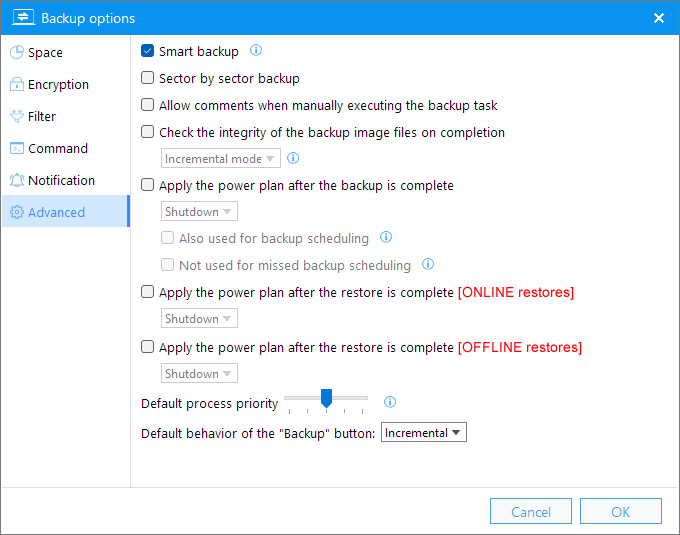
The reason is that when I do an offline restore, due to using a Bluetooth mouse/keyboard I can't exit the winre environment.
I don't want to set the default to "reboot", as that will cause a big surprise when doing online restores! And there's not much time to manually toggle the option once a restore has been initiated.
Posts: 25
Threads: 0
Joined: Nov 2023
Reputation:
1
06-21-2026, 09:52 AM
(This post was last modified: 06-21-2026, 09:53 AM by guest123.)
(06-21-2026, 02:45 AM)taotoo Wrote: I would like either:
Offline restores to automatically reboot the PC once finished; or
There to be two different settings for "Apply the powerplan after the restore is complete" - one for online restores, and one for offline restores.
The reason is that when I do an offline restore, due to using a Bluetooth mouse/keyboard I can't exit the winre environment.
I don't want to set the default to "reboot", as that will cause a big surprise when doing online restores! And there's not much time to manually toggle the option once a restore has been initiated. Just a friendly suggestion, stop using BT or wireless keyboards/mouse during pre-OS boot/winRE environments & stick to wired kb & mouse. I have seen some pretty weird situations happening due to a malfunctioning BT/wireless keyboard/mouse due to some temporary connection issue which would have been catastrophic in a pre-OS boot/winRE environment. I keep a cheap wired usb kb/mouse combo only for this purpose while my main daily driver still remains a BT keyboard & mouse.
Posts: 139
Threads: 10
Joined: Apr 2026
Reputation:
29
There are many temporary files created during a backup process (.vpf, .sbs, .idx, .vfp, .fpc, .fif, .ent). Would it be possible to have them created in a temporary folder rather than the target folder? If so could the folder be a specified in the Settings.
This would be helpful where the target is a OneDrive folder. Currently, when the backup processing is running these files, created in the local OneDrive folder, are mirrored to the cloud OneDrive storage. At the end of the process the temporary files are deleted. OneDrives issues a notification that "many files were recently deleted". The deleted files are retaining in the OneDrive recycle bin for 30 days.
This is not optimal.
Posts: 3,793
Threads: 88
Joined: Feb 2014
Reputation:
400
(06-21-2026, 02:45 AM)taotoo Wrote: I would like either:
Offline restores to automatically reboot the PC once finished; or
There to be two different settings for "Apply the powerplan after the restore is complete" - one for online restores, and one for offline restores.
The reason is that when I do an offline restore, due to using a Bluetooth mouse/keyboard I can't exit the winre environment.
I don't want to set the default to "reboot", as that will cause a big surprise when doing online restores! And there's not much time to manually toggle the option once a restore has been initiated.
Thanks for your suggestion, we'll think about it. Honestly, there are already too many backup options, is this really necessary?
Posts: 3,793
Threads: 88
Joined: Feb 2014
Reputation:
400
(06-22-2026, 12:21 AM)Bespoken Wrote: There are many temporary files created during a backup process (.vpf, .sbs, .idx, .vfp, .fpc, .fif, .ent). Would it be possible to have them created in a temporary folder rather than the target folder? If so could the folder be a specified in the Settings.
This would be helpful where the target is a OneDrive folder. Currently, when the backup processing is running these files, created in the local OneDrive folder, are mirrored to the cloud OneDrive storage. At the end of the process the temporary files are deleted. OneDrives issues a notification that "many files were recently deleted". The deleted files are retaining in the OneDrive recycle bin for 30 days.
This is not optimal.
Thanks for your suggestion. This has indeed caused some issues, and we’ll work on improving it in future releases.
Posts: 2
Threads: 0
Joined: Jun 2026
Reputation:
0
(06-22-2026, 02:02 AM)admin Wrote: (06-21-2026, 02:45 AM)taotoo Wrote: I would like either:
Offline restores to automatically reboot the PC once finished; or
There to be two different settings for "Apply the powerplan after the restore is complete" - one for online restores, and one for offline restores.
The reason is that when I do an offline restore, due to using a Bluetooth mouse/keyboard I can't exit the winre environment.
I don't want to set the default to "reboot", as that will cause a big surprise when doing online restores! And there's not much time to manually toggle the option once a restore has been initiated.
Thanks for your suggestion, we'll think about it. Honestly, there are already too many backup options, is this really necessary?
No, not really necessary - I guess I can use the power button to force a reboot instead.
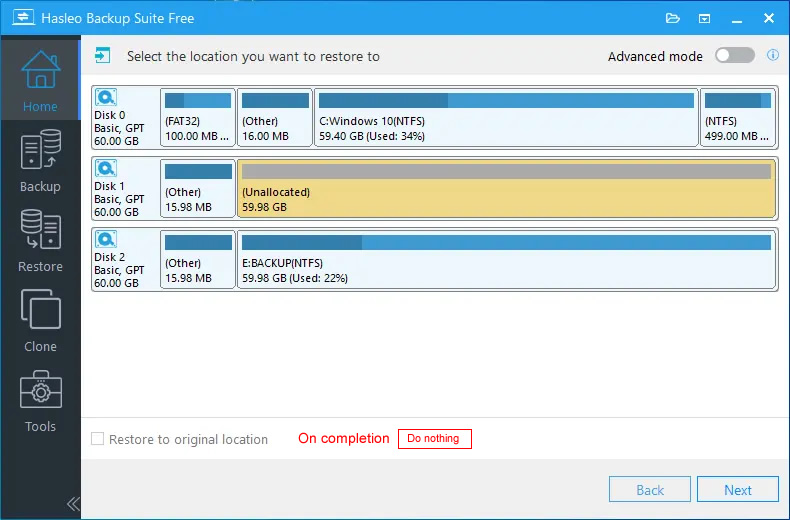
Alternatively, I don't know if it's possible to move/copy the dropdown menu to this screen:
Posts: 3,793
Threads: 88
Joined: Feb 2014
Reputation:
400
(06-23-2026, 11:28 AM)taotoo Wrote: (06-22-2026, 02:02 AM)admin Wrote: Thanks for your suggestion, we'll think about it. Honestly, there are already too many backup options, is this really necessary?
No, not really necessary - I guess I can use the power button to force a reboot instead.
Alternatively, I don't know if it's possible to move/copy the dropdown menu to this screen:
Thank you for your suggestion. Sometimes this area displays multiple settings options, leaving insufficient room for the "Power" option. However, we will consider other possible approaches to address this issue.
Posts: 523
Threads: 21
Joined: Nov 2024
Reputation:
162
07-14-2026, 03:59 PM
(This post was last modified: 07-14-2026, 05:44 PM by al3x.)
With the recent fix for the OneDrive exclusion I was wondering if the following would be possible:
- Exclude some folder like C:\Steam\ from the image backup.
- During delta restore you would have an option to keep C:\Steam\ untouched the way it is right now.
Realistically speaking I don't think it's possible because image restore works on block level.
But maybe it could be implemented somehow by watching over the changed blocks and prevent overwriting the data.
Or data could be moved to a temporary partition at the end and restored afterwards. But that could be a lengthy operation then.
That would be an awesome feature though, you could roll back your PC and keep excluded folders instead of them being purged.
|