

- Tutorial to Fix VSS 0x80042316 (VSS_E_SNAPSHOT_SET_IN_PROGRESS) Error
- Frequently Asked Questions
- Conclusion
This tutorial describes how to fix 0xXXXXXXXX80042316 (VSS 0x80042316 error - VSS_E_SNAPSHOT_SET_IN_PROGRESS, The shadow copy provider had an unexpected error while trying to process the specified operation.) error you encounter when performing backups or clones using Hasleo Backup Suite.
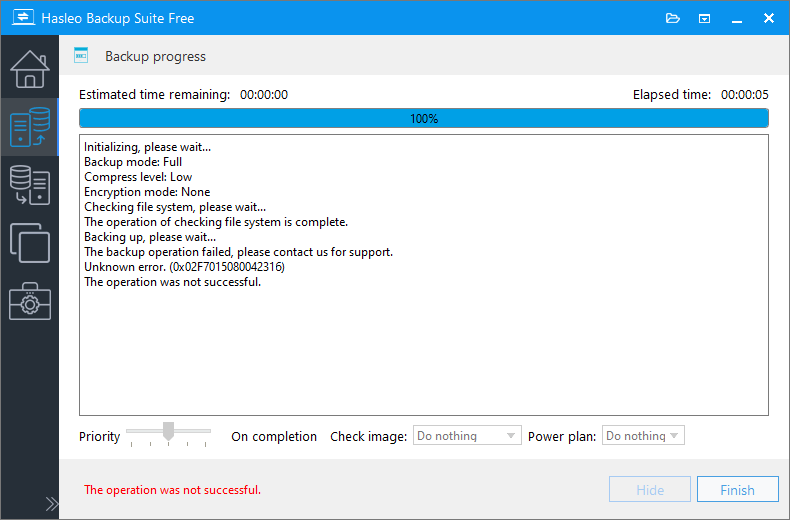
Hasleo Backup Suite uses Microsoft's Volume Shadow Copy Service (VSS) technology to implement Windows hot backup/cloning. You may encounter 0xXXXXXXXX80042316 error while performing backups or clones with Hasleo Backup Suite. The last 8 bytes (0x80042316) of which are the VSS error code returned by Windows. The VSS error code 0x80042316 (VSS_E_SNAPSHOT_SET_IN_PROGRESS) usually means that another VSS-based backup/clone is in progress on the computer, or that Windows Updates are currently running. Below we describe how to fix the VSS 0x80042316 (VSS_E_SNAPSHOT_SET_IN_PROGRESS) error.
Tutorial to Fix VSS 0x80042316 (VSS_E_SNAPSHOT_SET_IN_PROGRESS) Error
Cause 1. If there are other backup programs running on your computer, please stop them and ensure that they are not running backup tasks in the background, especially backups scheduled by the backup scheduler. It is best practice to only have one backup solution installed at any one time.
Cause 2. If Windows updates are currently running, please perform the backup after the updates are completed.
Frequently Asked Questions
A: This error means another VSS operation is in progress. Only one backup operation using VSS can run at a time on the same system.
A: Yes, Windows Update uses VSS for system protection. If updates are installing while you try to backup, you will get this error.
A: Check your scheduled backup tasks, antivirus backup features, and other backup software. Also check Event Viewer for VSS-related operations.
A: Yes, running two backup programs that use VSS simultaneously will cause this conflict. Use only one backup solution at a time.
A: Wait a minute or two for any background VSS operations to complete. If caused by Windows Update, wait for updates to finish.
A: No, your data is safe. The error simply indicates a conflict with another VSS operation.
A: Yes, uninstall or disable other backup software to prevent conflicts. Keep only one backup solution installed.
A: Yes, if a scheduled backup starts while you're trying to manually back up, it will conflict. Check your backup scheduler settings.
Conclusion
This tutorial describes how to fix the 0xXXXXXXXX80042316 (VSS 0x80042316 error - VSS_E_SNAPSHOT_SET_IN_PROGRESS) error you encounter when performing backups or clones using Hasleo Backup Suite.
Related Articles
- How to create an App Password in Gmail that you can use to send emails in Hasleo Backup Suite?
- How to fix Dokan not installed or Dokan version not supported error?
- How to fix VSS 0x80042306 (VSS_E_PROVIDER_VETO) error?
- How to back up and restore Windows 11 for free?
- How to Use the Deduplication in Hasleo Backup Suite to Save Storage Space?


