

- Tutorial to Fix the VSS 0x8004230F (VSS_E_UNEXPECTED_PROVIDER_ERROR) Error
- Frequently Asked Questions
- Conclusion
This tutorial describes how to fix 0xXXXXXXXX8004230F (VSS 0x8004230F error - VSS_E_UNEXPECTED_PROVIDER_ERROR, The shadow copy provider had an unexpected error while trying to process the specified operation.) error you encounter when performing backups or clones in Hasleo Backup Suite.
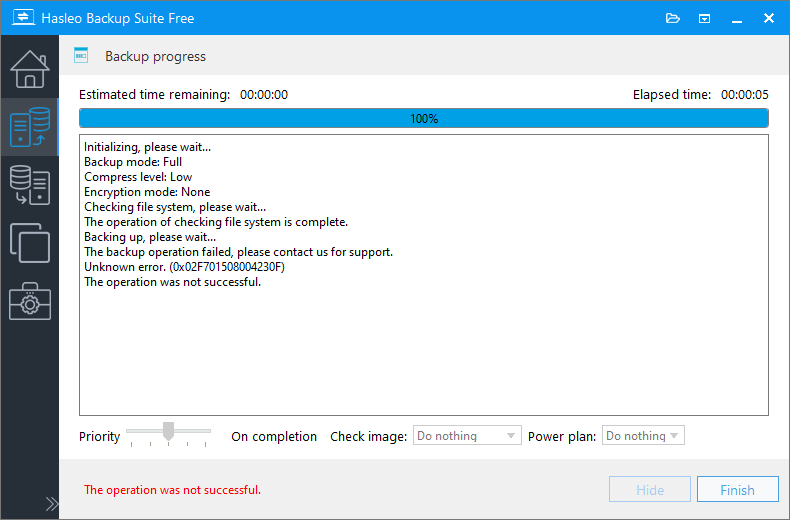
Hasleo Backup Suite uses Microsoft's Volume Shadow Copy Service (VSS) technology to implement Windows hot backup/cloning. During these tasks, you may encounter 0xXXXXXXXX8004230F error. The last 8 bytes (0x8004230F) represent the specific VSS error code from Windows. The VSS error code 0x8004230F (VSS_E_UNEXPECTED_PROVIDER_ERROR) usually means that the backup process could not initialize due to a third-party VSS provider component installed on your system. Below we describe how to fix the VSS 0x8004230F (VSS_E_UNEXPECTED_PROVIDER_ERROR) error.
Tutorial to Fix the VSS 0x8004230F (VSS_E_UNEXPECTED_PROVIDER_ERROR) Error
Step 1. Open an elevated cmd.exe prompt and type "vssadmin list providers".
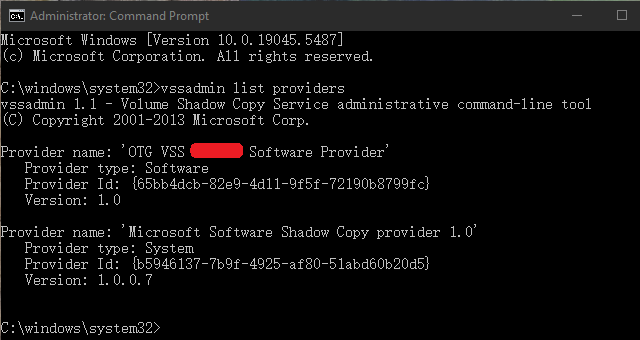
The presence of multiple VSS providers can cause conflicts. If third-party backup software (e.g., Acronis, Symantec, or Macrium) is installed, its VSS provider can interfere with native backup tools (Microsoft Software Shadow Copy provider) and other applications that attempt to perform a VSS backup or clone.
Step 2. Uninstall the relevant third-party software. You can identify the software by referring to the list of VSS providers displayed in Step 1.
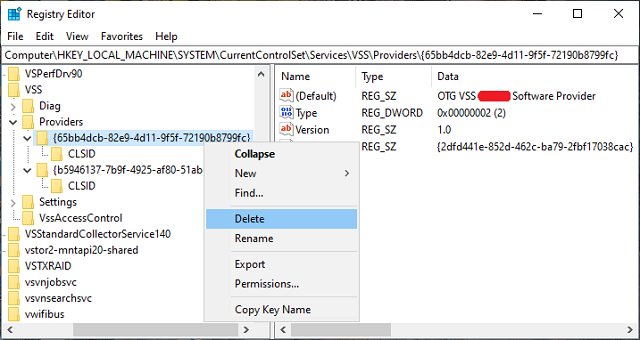
Step 3. Remove the registry keys for these third-party VSS Providers. The installed VSS Providers can be found in the Registry Key: HKEY_LOCAL_MACHINE\SYSTEM\CurrentControlSet\Services\VSS\Providers\
Step 4. Restart Windows and try running Hasleo Backup Suite again.
Frequently Asked Questions
A: This error occurs when a third-party VSS provider conflicts with the native Microsoft Software Shadow Copy Provider.
A: Run "vssadmin list providers" in Command Prompt as administrator. Look for providers from third-party backup software in the list.
A: VSS providers are stored at HKEY_LOCAL_MACHINE\SYSTEM\CurrentControlSet\Services\VSS\Providers\ in Windows Registry.
A: Yes, restart your computer after removing third-party VSS providers for the changes to take effect.
A: No, you must remove the third-party VSS provider to fix the conflict. Either uninstall the software or remove its VSS provider from registry.
A: Both are VSS provider errors. 0x8004230F indicates an unexpected provider error, while 0x80042306 indicates a provider veto. Both are fixed similarly.
A: Yes, once the conflicting provider is removed, Hasleo Backup Suite should work normally with VSS hot backup.
Conclusion
This tutorial describes how to fix the 0xXXXXXXXX8004230F (VSS 0x8004230F error - VSS_E_UNEXPECTED_PROVIDER_ERROR) error you encounter when performing backups or clones using Hasleo Backup Suite.
Related Articles
- How to create an App Password in Gmail that you can use to send emails in Hasleo Backup Suite?
- How to fix Dokan not installed or Dokan version not supported error?
- How to fix VSS 0x80042306 (VSS_E_PROVIDER_VETO) error?
- How to back up and restore Windows 11 for free?
- How to back up and restore Windows 10 for free?


