What is BitLocker recovery key?
The BitLocker recovery key and BitLocker password are different things. The BitLocker password is the password you entered to encrypt the drive when you turn on Bitlocker Drive Encryption on that drive. The BitLocker recovery key is a special key that you can create when you turn on Bitlocker Drive Encryption for the first time on each drive that you encrypt. The recovery key is what enables Bitlocker to recover things for you when you forgot your BitLocker password. In other words, if you forget your BitLocker password, you can use BitLocker recovery key to access the data protected by BitLocker. And if you forget your BitLocker password and lost your BitLocker recovery key, then there is no way for you to access the data protected by BitLocker. This is why Microsoft puts an emphasis on the fact that you should store the recovery key by printing it, saving it on removable media, or saving it as a file in a secure place.
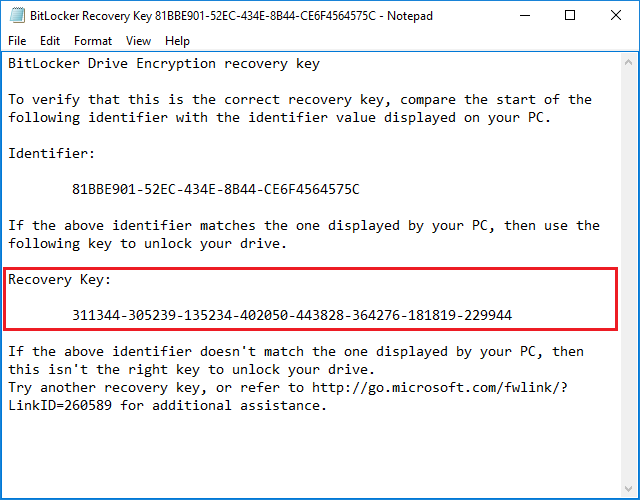
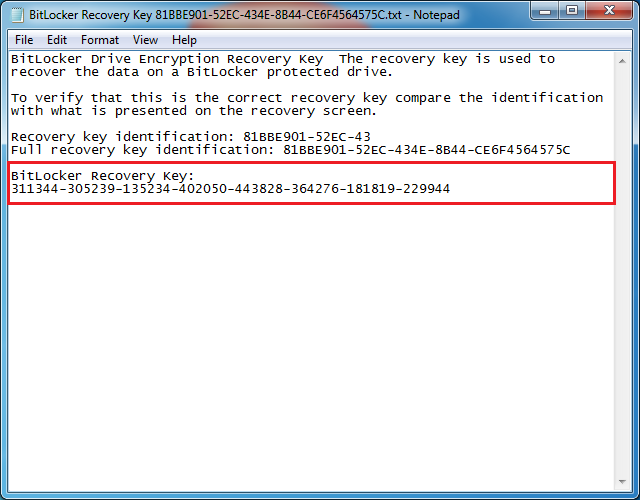
The BitLocker recovery key is stored in a BEK (BitLocker Encryption Key) or TXT file named like 'BitLocker Recovery Key 81BBE901-52EC-434E-8B44-CE6F4564575C.BEK' or 'BitLocker Recovery Key 81BBE901-52EC-434E-8B44-CE6F4564575C.TXT'.
How to find Bitlocker recovery key?
If you forget the BitLocker password used to encrypt a partition, you can use Bitlocker recovery key to unlock the partition protected by BitLocker. If you have forget the BitLocker recovery key, there are 4 possible ways to find BitLocker recovery key:
1. When you encrypt a partition, Microsoft will prompt you to save or print the Bitlocker recovery key. If you have saved the Bitlocker recovery key to a file, a removable media, or printed on a piece of paper. You just need to find it.
2. If your computer is connected to a domain, contact your system administrator to get your Bitlocker recovery key.
3. If you were signed in to your Microsoft account when you encrypted a drive with Bitlocker Drive Encryption, go to Microsoft account to get your BitLocker Recovery Key.
4. Ask someone with administrator privileges on the same computer to unlock it with their key.
Frequently Asked Questions
A: A BitLocker recovery key is a special 48-digit numerical key generated when you enable BitLocker encryption. It serves as a backup method to unlock your encrypted drive if you forget your password. The recovery key is essential because without either the password or recovery key, your encrypted data becomes permanently inaccessible.
A: BitLocker recovery key can be found in several places: 1) A saved file on your computer when you initially enabled BitLocker, 2) A printed paper copy if you chose to print it, 3) Your Microsoft account (if you signed in with one when encrypting), or 4) Contact your domain administrator if your PC is on a corporate domain.
A: No, it is not possible to recover data from a BitLocker encrypted drive without either the password or the recovery key. Microsoft designed BitLocker with strong encryption specifically to prevent unauthorized access. If you have lost both the password and recovery key, the encrypted data cannot be recovered by any method.
A: The BitLocker password is what you enter daily to unlock your encrypted drive. The recovery key is a backup password consisting of 48 digits that should be stored separately. You use the recovery key only when you have forgotten your primary password or cannot access your system normally.
A: Yes, if you were signed in to your personal Microsoft account when you enabled BitLocker on your drive, you can retrieve the recovery key from your Microsoft account online. Visit the BitLocker recovery key page at Microsoft account and sign in with the same account to view your stored recovery keys.
A: If you lose your BitLocker recovery key and also forget your password, you will lose permanent access to all data on the encrypted drive. Microsoft cannot provide a recovery key, and there is no way to bypass BitLocker encryption. This is why Microsoft strongly recommends saving the recovery key in multiple safe locations.
Related Articles
- How to Recover Lost Files From BitLocker Encrypted Drive?
- How to recover data from Bitlocker encrypted partition in Windows 10?
- How to recover deleted or lost Bitlocker encrypted partition in Windows 10?
- How to recover data from accidentally formatted BitLocker encrypted drive?
- How to recover deleted/lost files from BitLocker To Go encrypted USB flash drive?