The Boot Configuration database (BCD) is a configuration file used by Windows Vista and later operating systems to store and manage the installed operating systems on a computer. As a replacement for the traditional boot.ini, it uses a binary format storage structure to record multi-boot configurations, startup parameters, and advanced options (e.g., Safe mode, Debug mode). In fact, for an average Windows user, we only need to think of it as a file that stores the Windows boot menu entries.
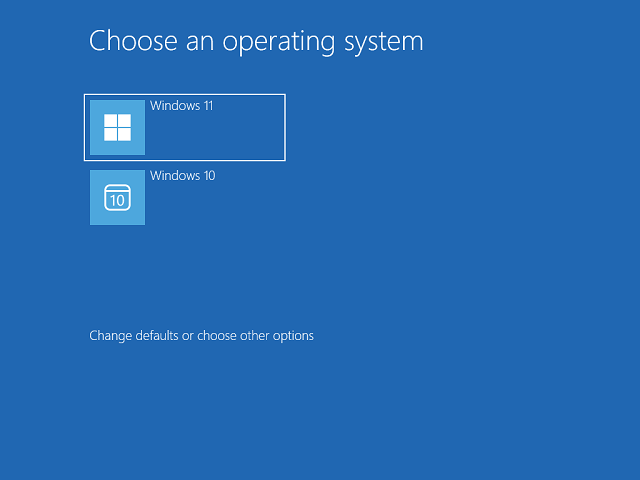
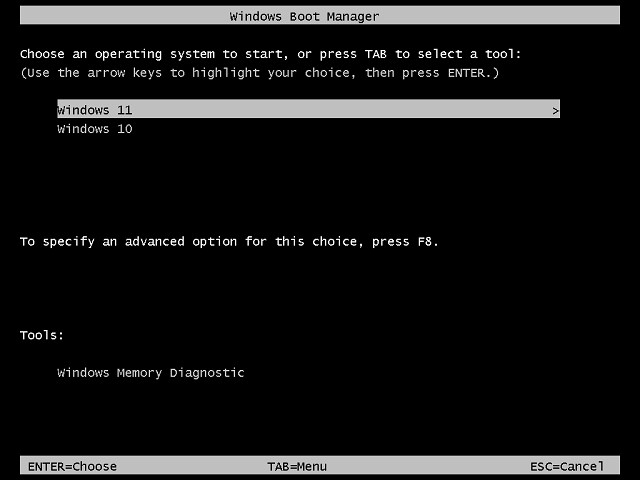
When the computer is started, the Windows loader reads the multi-boot information stored in the BCD file and presents it to the user in a modern graphical boot menu or a traditional character mode boot menu, allowing the user to select the operating system to boot based on their needs, as shown in the screenshots below:
Frequently Asked Questions
A: BCD (Boot Configuration Data) is a configuration file used by Windows Vista and later to store boot settings. It contains information about installed operating systems, boot menu entries, startup parameters, and advanced options like Safe Mode and Debug Mode. Think of it as the modern replacement for the old boot.ini file.
A: The BCD store is typically located at C:\Boot\BCD on your system drive. On UEFI systems, there's also a BCD store in the EFI System Partition. The BCD uses a binary format that requires special tools to view and edit.
A: You can repair BCD using the bcdedit command in Command Prompt or by running 'bootrec /rebuildbcd' from Windows Recovery Environment. For more advanced repairs, you can use EasyUEFI's BCD management features to rebuild or restore the boot configuration.
A: boot.ini was used in older Windows XP and earlier systems with Legacy BIOS. BCD replaced boot.ini starting with Windows Vista and is used on both UEFI and BIOS systems. BCD supports more features including more boot entries, better security, and works with UEFI firmware.
A: Yes, you can create custom boot entries using bcdedit command or EasyUEFI. This is useful for adding alternative Windows installations, WinPE environments, or other bootable programs to your boot menu.
A: The main command is 'bcdedit' which can list, create, delete, and modify boot entries. You can also use 'bootrec' with options like /fixmbr, /fixboot, and /rebuildbcd for repair operations. EasyUEFI provides a graphical interface for easier BCD management.
A: Windows has a modern graphical boot menu (used on UEFI systems) and a legacy text-based menu (used on BIOS systems). Both pull their information from the BCD, but display differently based on your system's firmware type.
A: Yes, you can export BCD entries using 'bcdedit /export' command to create a backup file. This backup can be imported later using 'bcdedit /import'. This is useful before making changes or when troubleshooting boot issues.