Hasleo BitLocker Anywhere For Linux is the world's first and only Linux software which you can use it to decrypt BitLocker encrypted drives on Linux, with it you can easily decrypt BitLocker encrypted drive. Please note that you must have the correct access password or recovery key to decrypt the drive. Below we will show you how this is done.
 Tips:
Tips:
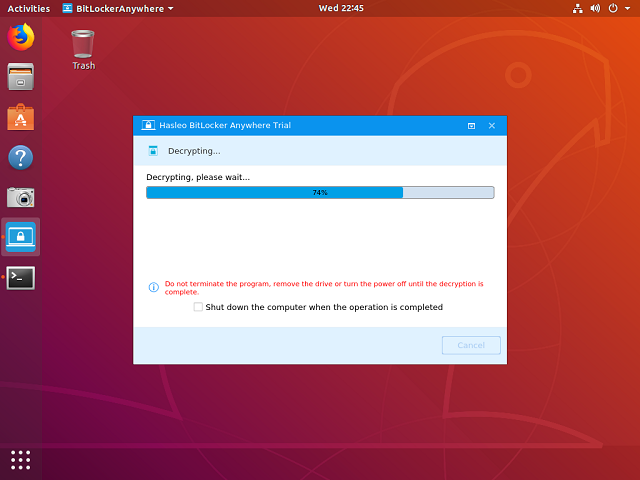
- Terminating the program, removing the drive or abnormal power off during decryption will result in data corruption.



Tutorial to Decrypt BitLocker Drive in Linux.
Step 1. Download and extract Hasleo BitLocker Anywhere For Linux.
Step 2. Open a terminal as a non-root user, go to the bin subfolder under the extract folder, then execute the 'run.sh' script to start the program.
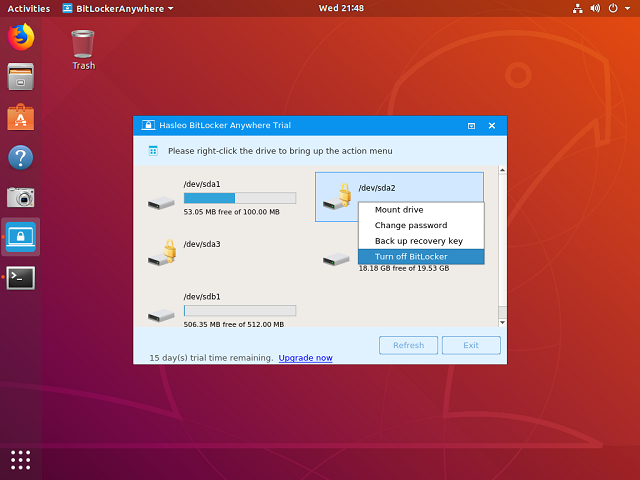
Step 3. Right-click the BitLocker encrypted drive you want to decrypt in main window, then click "Turn off BitLocker".
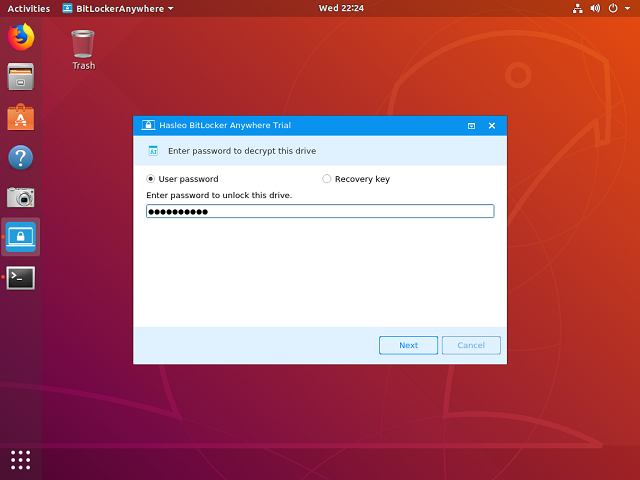
Step 4. Enter the password or recovery key, then click "Next".
Step 5. Hasleo BitLocker Anywhere For Linux will now decrypt the contents of the selected drive using BitLocker drive encryption. The decryption process could take a long time to finish depending on the size of the drive, so please be patient to wait. If you don't want to wait until the decryption operation is finished, "Shut down the computer when the operation is completed" option is a good idea. Just check it.
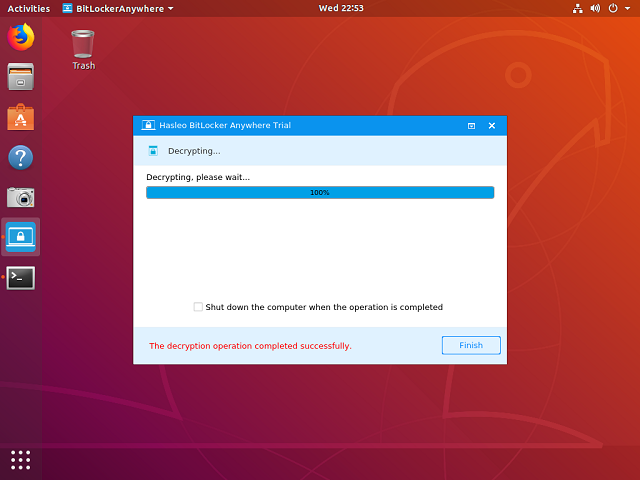
Step 6. After the decryption is complete, click the "Finish" button to return to the main window.
As described above, with the help of Hasleo BitLocker Anywhere For Linux you can decrypt a BitLocker encrypted drive in Linux in just a few simple steps. As a All-in-one BitLocker solution for Linux, you can also use Hasleo BitLocker Anywhere For Linux to encrypt drives with BitLocker in Linux, or read and write BitLocker encrypted drives in Linux.
Frequently Asked Questions (FAQ) for Decrypting BitLocker Drive in Linux
A: Yes, Hasleo BitLocker Anywhere For Linux is the world's first and only Linux software that can decrypt BitLocker encrypted drives on Linux.
A: You must have Hasleo BitLocker Anywhere For Linux installed and have the correct BitLocker password or recovery key to decrypt the drive.
A: Yes, you can use either your BitLocker password or the recovery key to authenticate and decrypt the BitLocker encrypted drive in Linux.
A: The decryption process could take a long time depending on the size of the drive. You can select the option to shut down the computer when the operation is completed.
A: Terminating the program, removing the drive, or abnormal power off during decryption will result in data corruption. It is important to ensure the process completes without interruption.
A: Yes, Hasleo BitLocker Anywhere For Linux can decrypt both internal and external BitLocker encrypted drives including USB flash drives and external hard drives.
A: Unlocking (mounting) allows you to access the drive while it remains encrypted. Decrypting (turning off BitLocker) permanently removes the encryption from the drive.
A: Yes, after decrypting, you can use Hasleo BitLocker Anywhere For Linux to re-encrypt the drive with BitLocker again whenever needed.