

M3 BitLocker Data Recovery is a BitLocker data recovery software which can help you recover data from BitLocker Encrypted Drive. Because of the extremely high pricing of the software, we have noticed that there are many users searching for "M3 BitLocker Data Recovery license key", "M3 BitLocker Data Recovery keygen", "M3 BitLocker Data Recovery crack", etc. There are risks in using unofficial sources for software licensing, which may compromise data security or cause the disclosure of personal information, so finding a legitimate alternative to M3 BitLocker Data Recovery is the best choice.
Are you looking for alternative to M3 BitLocker Data Recovery to effectively recover lost or deleted files from BitLocker Encrypted Drive? Here we recommend Hasleo BitLocker Data Recovery, a professional BitLocker data recovery solution. It helps you recover deleted or lost data from BitLocker-encrypted drives - whether they are formatted, inaccessible, failed, or damaged. It also supports recovering data from deleted or lost BitLocker partitions. With a cleaner interface, superior recovery quality, and faster scanning speed, Hasleo BitLocker Data Recovery delivers a better user experience. Contact us at [email protected] to request a volume discount.
The Best Alternative to M3 BitLocker Data Recovery
Step 1: Download, install, and run Hasleo BitLocker Data Recovery

Step 2: Select a Location to Scan
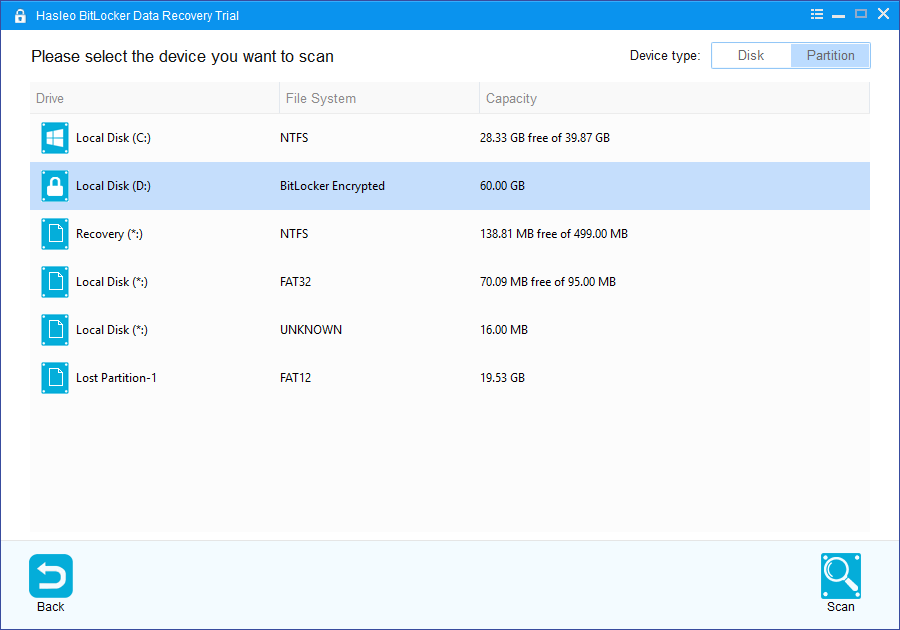
1. Select the hard disk or partition where you lost your files, then click the "Scan" button to find all BitLocker-encrypted partitions on the device.
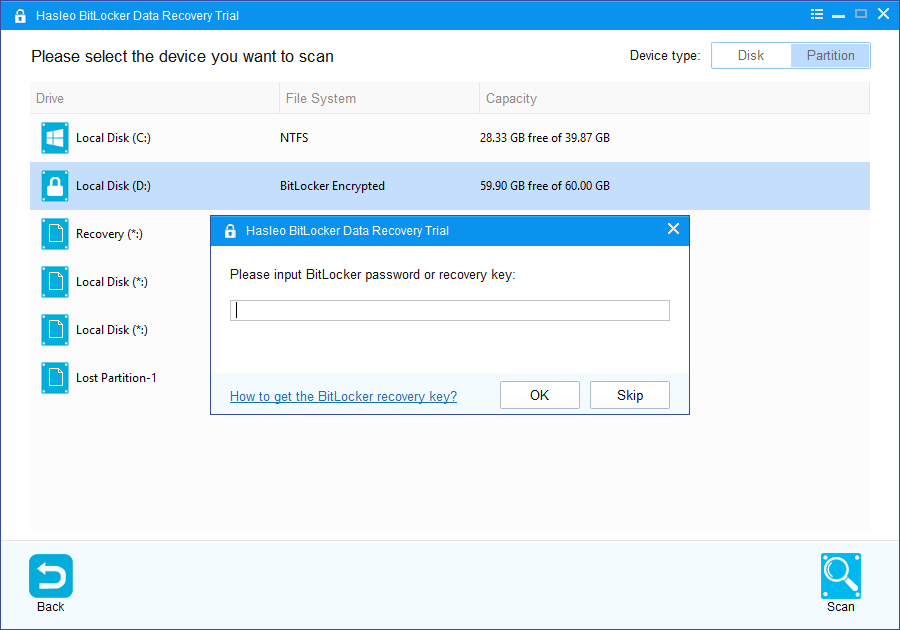
2. A pop-up window will appear asking you to enter the BitLocker password or 48-digit BitLocker recovery key. If you don't want to enter the password or BitLocker recovery key here, just click the "Skip" button to skip it.
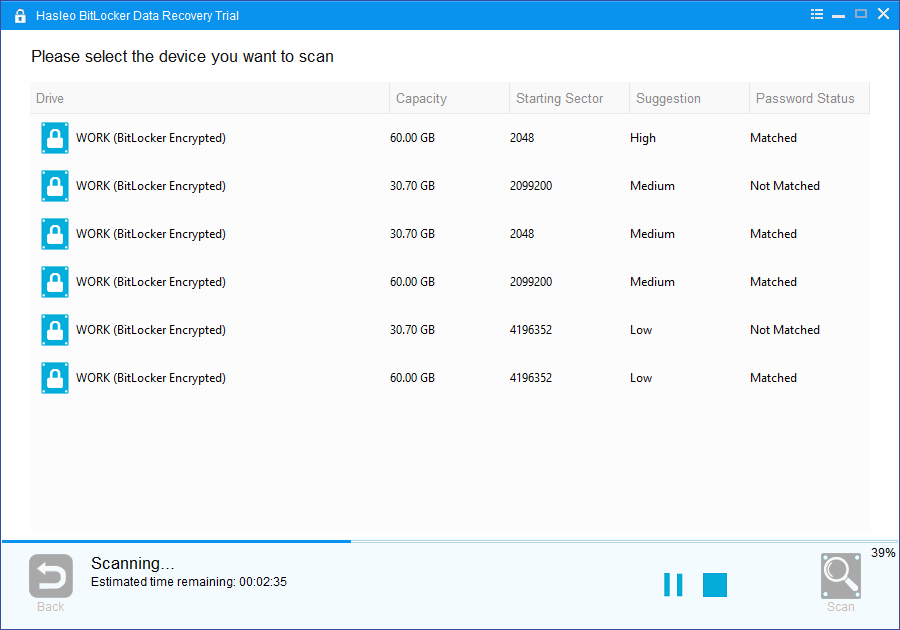
3. Hasleo BitLocker Data Recovery will list all found BitLocker encrypted partitions on the target device. If you have entered the password or BitLocker recovery key in the previous step, the password status will show whether the password or BitLocker recovery key matches this partition.
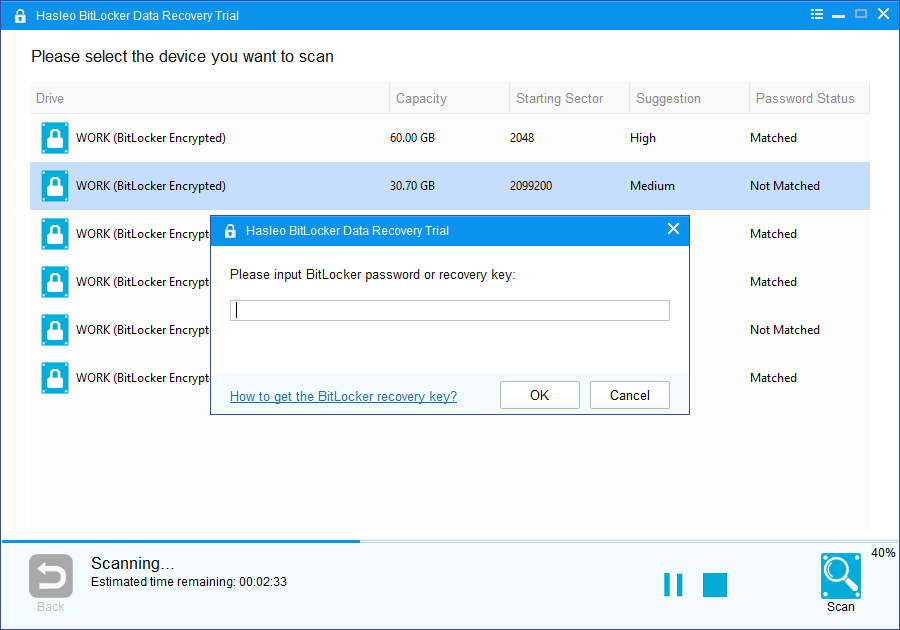
4. Double-click the BitLocker-encrypted partition you want to recover data from. If you have previously entered a valid password or recovery key, Hasleo BitLocker Data Recovery will begin scanning for lost files immediately. If not, a pop-up window will prompt you to enter the password or BitLocker recovery key. After entering the correct credentials, click "OK", and the scan will start automatically.
Step 3: Preview and Recover Deleted Files
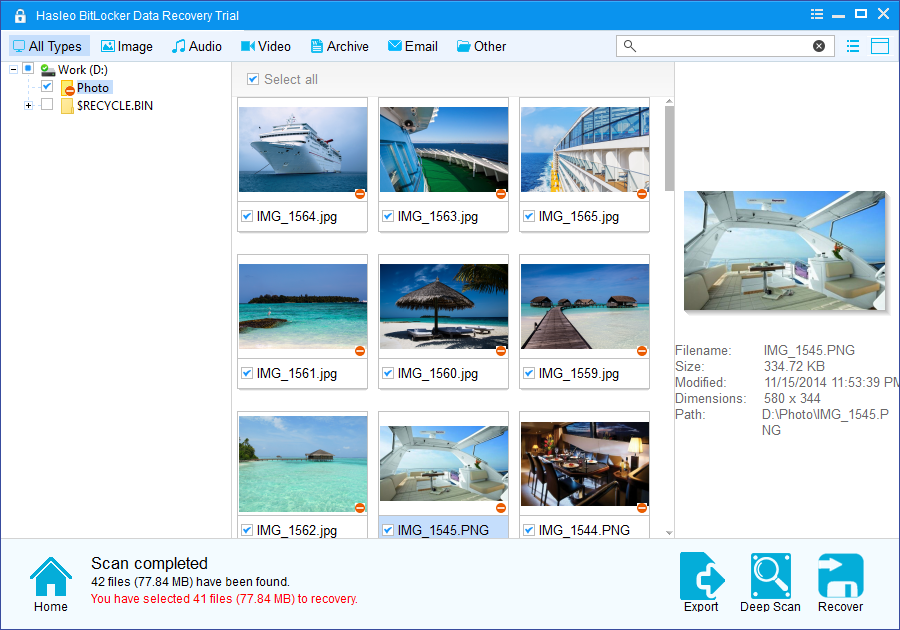
After scanning, the software will display a list of found files. You can preview them by browsing their paths or types. Select the files you wish to recover, then click the "Recover" button to save them to a destination of your choice. If your desired files are not found, click "Deep Scan" to initiate the Deep Scan Recovery process. This process takes additional time but can recover many more lost files.
Frequently Asked Questions (FAQ) for M3 BitLocker Data Recovery Alternative
A: No, using unauthorized or pirated software is not safe. Such software may contain malware, viruses, or backdoors that can damage your data or compromise your personal information. Additionally, unauthorized software may not function properly, leading to data loss or recovery failures.
A: Unofficial serial keys or license keys may be stolen, revoked, or cause software malfunction. Using such keys can also expose you to legal consequences due to software piracy. Furthermore, you won't receive official support or updates.
A: Hasleo BitLocker Data Recovery offers a cleaner interface, superior recovery quality, and faster scanning speed. It's a legitimate solution that provides regular updates and technical support, ensuring your data recovery is safe and reliable.
A: You need either the BitLocker password or the 48-digit recovery key to access the encrypted drive. Without either, the software cannot decrypt and recover data from the drive. However, Hasleo BitLocker Data Recovery can scan the drive after you provide the correct credentials.
A: Yes, Hasleo BitLocker Data Recovery supports Windows 10, Windows 11, Windows Server 2016, 2019, and 2022. It can recover data from BitLocker-encrypted drives on these operating systems.
A: Hasleo BitLocker Data Recovery can recover data from BitLocker-encrypted drives that are formatted, inaccessible, failed, damaged, or from deleted or lost BitLocker partitions. It supports recovery of various file types including documents, photos, videos, and more.
A: Yes, Hasleo BitLocker Data Recovery offers a free trial version that allows you to scan and preview recoverable files before purchasing the full version. You can download it from the official website.
A: Hasleo BitLocker Data Recovery uses advanced scanning algorithms and supports both quick scan and deep scan modes, which typically result in higher recovery success rates. The software is regularly updated to improve compatibility and recovery capabilities.
In summary, Hasleo BitLocker Data Recovery is the best alternative to unauthorized versions of M3 BitLocker Data Recovery. It allows you to recover data from BitLocker-encrypted drives more efficiently and faster - legally and safely.
Related Articles
- How to recover data from BitLocker encrypted drive?
- How to recover data from formatted BitLocker encrypted drive?
- How to recover data from BitLocker encrypted drive in Windows 10?
- How to recover files from deleted or lost BitLocker encrypted partition?
- How to recover files from a damaged or corrupted BitLocker encrypted partition?