

- Delta Clone vs. Full Clone
- Overview of Delta Clone in Hasleo Backup Suite
- How to Use Delta Clone in Hasleo Backup Suite to Clone Your System Quickly?
- Frequently Asked Questions
- Summary
Hasleo Backup Suite is comprehensive and cost-effective software that provides backup and restore functions, along with support for systems, disks/partitions, and files/folders cloning. This guide will introduce its advanced Delta Clone feature and explain how to use it to quickly clone a system to a new disk.
Delta Clone vs. Full Clone
In data backup, cloning refers to creating an exact copy of the source data. Full Clone and Delta Clone are two different cloning methods. Full Clone refers to creating an exact, sector-by-sector copy of the entire source device (e.g., a disk or partition). This process clones all data from the source device, including the OS, applications, and settings, to the target device without modification. In contrast, Delta Clone synchronizes only the data that has changed since the last Full Clone to the target disk.
Each of the two modes has its advantages. Full Clone creates a complete copy of the source disk, ensuring data security, however, the cloning process is time-consuming. Delta Clone is much faster but must be based on an existing Full Clone and cannot function alone.
The following table compares Full Clone and Delta Clone to help better understand the differences between these two methods.
| Delta Clone | Full Clone | |
| Working Principle | Clone only changed data blocks | Clone all sectors or file-based data from the source disk |
| Disk Space Usage | Occupy less target disk space | Significant disk space usage |
| Clone Speed | Fast | Slow |
| Independence | Low (dependent on the last Full Clone) | High (fully independent copy) |
| Partition Structure Tolerance | Low (require identical partition structures on source and target disks) | High (allow modification of the target disk partition layout) |
| Data Status | Synchronize with the latest changes upon execution | Capture the complete state at execution time |
Overview of Delta Clone in Hasleo Backup Suite
The purpose of Delta Clone is to clone only the data blocks that have changed relative to a historical benchmark point. Therefore, its most important technology for Delta Clone is rapid and efficient detection of these changed blocks. With an in-depth understanding of file system technology, Hasleo has developed advanced block change detection algorithms that can efficiently identify changed blocks, guaranteeing data consistency between the source and target disks while removing the resource waste caused by unnecessary data copying. In addition, it also has the following advantages:
- Reduce cloning time: Since it precisely clones only the changes data blocks, the process is significantly faster, saving you time without the long wait.
- Reduce I/O load: This technology only clones the changed data blocks, significantly reducing the I/O workload compared to a Full Clone.
- Reduce power consumption: The significant reduction in I/O load directly lowers power consumption.
- Reduce impact on the source OS: The impact on the source OS will be reduced due to the reduction in I/O load and time required for cloning.
Given these advantages, you can employ Delta Clone to regularly synchronize data disks, back up system disks, or create identically configured virtual machines for software/system testing. When using this powerful feature in Hasleo Backup Suite, please keep the following points in mind:
- The feature currently only applies to cloning NTFS/ReFS partitions. Non-NTFS/Non-ReFS partitions will still be cloned using Full Clone
- The destination NTFS/ReFS partition must be greater than or equal to the source NTFS/ReFS partition, and the destination Non-NTFS/Non-ReFS partition must be equal to the source partition.
- The source NTFS/ReFS partition and the target NTFS/ReFS partition must have the same cluster size.
- All Windows operating system related source partitions (system, boot and recovery partitions) must have corresponding copies on the destination drive, and the copies must remain in the same order as the source partitions.
How to Use Delta Clone in Hasleo Backup Suite to Clone Your System Quickly?
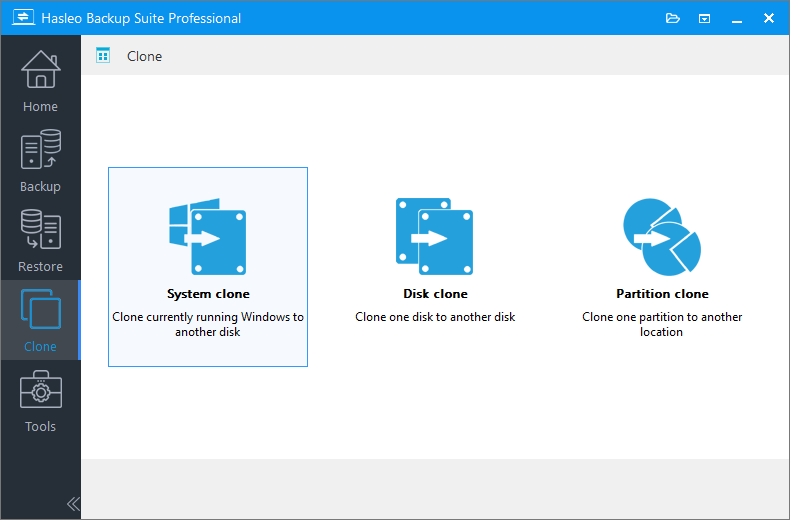
Step 1. Download, install, and run Hasleo Backup Suite. Click the "Clone" button in the navigation bar, then select "System clone" in the operation area.
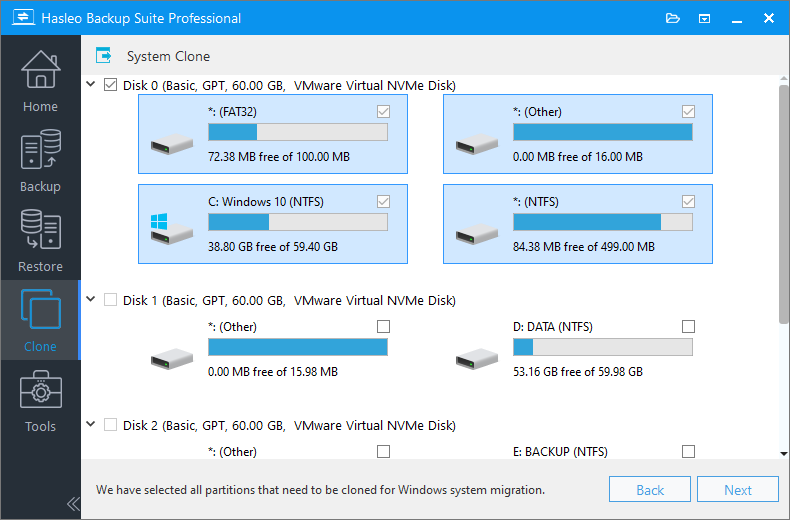
Step 2. Hasleo Backup Suite automatically selects all partitions required for cloning Windows. Click "Next" to continue.
Step 3. Select the destination disk that contains the existing source Windows OS clone. Then, check the "Delta Clone" checkbox and click "Next".
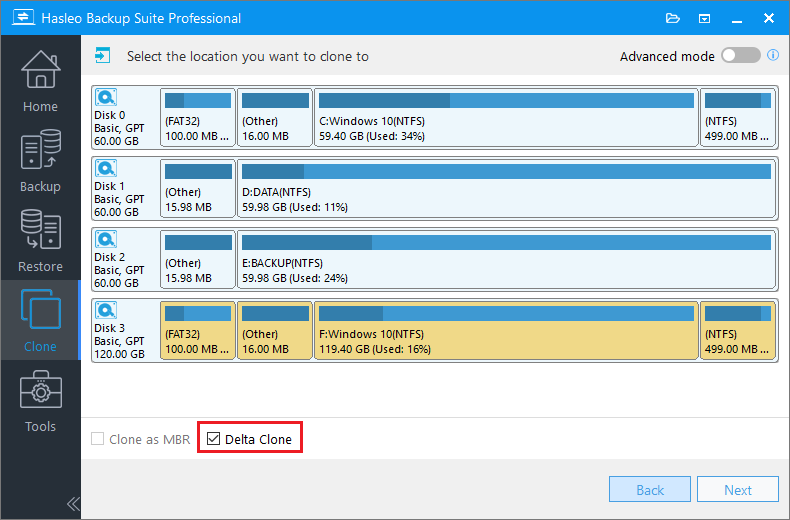
* Tips: The Delta Clone operation will overwrite the corresponding sectors on the target disk. Please ensure that there are no other important files on the target disk.
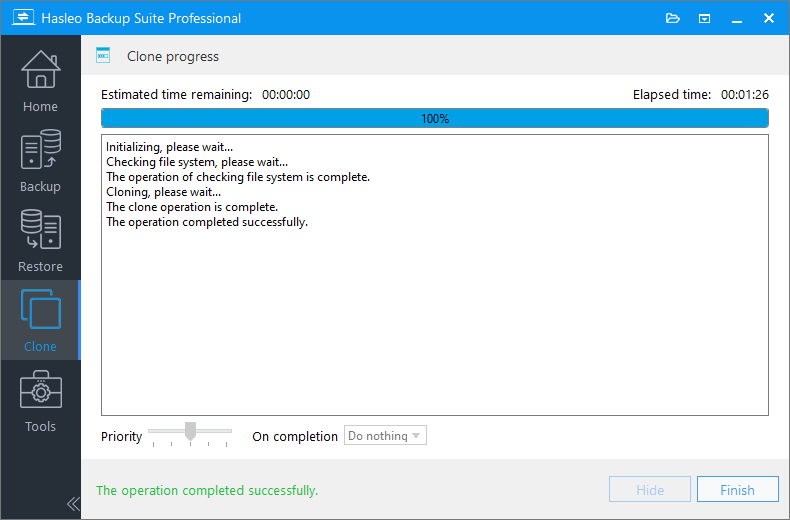
Step 4. Hasleo Backup Suite starts the delta cloning process, copying only the changed data blocks from the source Windows to the destination. The operation time depends on the amount of changed data blocks on the source system disk. In extreme cases, it can finish in seconds.
Frequently Asked Questions
A: Delta Clone is an advanced cloning technology that only copies data blocks that have changed since the last full clone, significantly reducing cloning time and I/O load compared to traditional full cloning.
A: Yes, Delta Clone requires an existing full clone on the target disk as a baseline. It detects changes from the source disk and copies only the incremental data to keep the target in sync.
A: Delta Clone currently supports NTFS and ReFS partitions. For FAT32, exFAT, or other file system partitions, the full clone method will be used automatically.
A: No, Delta Clone requires identical partition structures between source and target disks. For partition resizing, you need to use full clone instead.
A: Delta Clone is significantly faster because it only copies changed data blocks. In extreme cases where only minimal data has changed, it can complete in seconds, while full clone may take much longer depending on disk size.
A: The destination NTFS/ReFS partition must be greater than or equal to the source NTFS/ReFS partition. For non-NTFS/non-ReFS partitions, the destination must be exactly the same size as the source.
A: No, Delta Clone requires the target disk to already have an existing clone of the source system. For disk migration to a new computer, you must use full clone first, then Delta Clone for subsequent updates.
Summary
The Delta Clone feature in Hasleo Backup Suite is powerful, allowing you to quickly clone your system to another disk. This significantly reduces cloning time and lowers energy consumption. As professional backup software, it also provides multiple backup modes (full, incremental, and differential), along with support for compressing, encrypting, merging and deleting backup images. With its comprehensive features and superior performance, Hasleo Backup Suite offers excellent value for money, making it the best choice for your data protection needs. Download now to begin your backup journey!
Related Articles
- How to Use the Deduplication in Hasleo Backup Suite to Save Storage Space?
- How to back up and restore Windows 11 for free?
- How to Merge/Delete Old Backup Files using Hasleo Backup Suite Free?
- Best Windows Server Backup and Restore Software in 2026
- How to set up backup schedules to automatically backup Windows?


