

- Overview of VSS and WMI
- Brief introduction to Hasleo Backup Suite
- How to Repair Windows VSS issues Using Hasleo Backup Suite?
- Frequently Asked Questions
- Conclusion
When the Windows Volume Shadow Copy Service (VSS) fails, the system's backup and restore functions are severely affected—for example, creating system restore points may fail, or backup software may not operate correctly. This guide will show how to use Hasleo Backup Suite to fix Windows VSS issues.
Overview of VSS and WMI
Volume Shadow Copy Service (VSS) is a set of APIs provided by Microsoft for Windows operating systems, designed to implement a framework that allows backup programmes to perform volume backups while other applications are writing to the volume. Backup programmes create a snapshot of the volume through the VSS API, which stores a copy of the volume's data at that moment, and any subsequent writes to the volume by applications will not appear in the snapshot, allowing the backup programme to read the snapshot data to perform hot backups.
Windows Management Instrumentation (WMI) is one of the core management infrastructures of the Windows operating system. Within the VSS framework, multiple components provide management interfaces, report operational status and receive control instructions through WMI. Therefore, the stability of WMI directly affects the availability of the VSS service and related management functions.
Many Windows backup programs, including Hasleo Backup Suite, rely on VSS to perform hot backups. If WMI is malfunctioning, these programs will be unable to execute backup operations normally. In such cases, repairing VSS is usually the most effective way to resolve these issues.
Brief introduction to Hasleo Backup Suite👑
Hasleo Backup Suite is a professional backup software renowned for its outstanding performance and comprehensive features. It integrates data backup, disk cloning, and system restoration, fully supporting Windows operating systems. Its built-in tools include the "Repair VSS" function, which can fix common VSS service faults, ensuring that backup operations relying on VSS can proceed normally.
Beyond core backup, restore, and clone functions, Hasleo Backup Suite also integrates a variety of efficient and practical features, such as:
- Rebuild MBR: Repair the MBR to fix boot failures.
- Add Boot Menu: Enable this feature to enter the recovery environment even without a bootable medium, allowing emergency system recovery.
- Mount/Unmount Image: Enable this feature to browse files in the backup image without performing a restore operation.
- Emergency Disk: Allows users to create a personalized WinPE bootable disk for system maintenance and repair.
- Wipe Drive: Permanently erase all data on the selected drive to prevent data leakage.
- And More: Check Image, PXE Server...
How to Repair Windows VSS issues Using Hasleo Backup Suite?
Step 1. Download, install, and run Hasleo Backup Suite. Click the "Tools" button in the navigation bar, then choose "Repair VSS" in the action area.
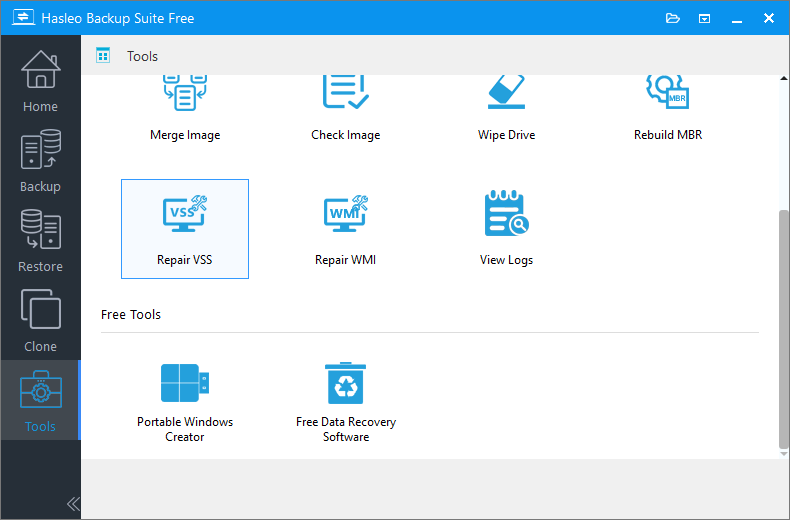
Step 2. Hasleo Backup Suite is now repairing VSS. Please wait for the process to complete. This may take a few moments.
Frequently Asked Questions
A: VSS (Volume Shadow Copy Service) is a Windows backup framework that allows applications to create point-in-time snapshots while other applications continue writing to the volume. Many backup programs rely on VSS for hot backups.
A: Common causes include corrupted system files, WMI (Windows Management Instrumentation) issues, misconfigured shadow copy storage, disk space problems, or conflicting backup software.
A: No. Repair VSS only resets service configurations and cleans up corrupted components. Your actual data files remain untouched.
A: Open Command Prompt and run "vssadmin list shadows" to check if shadow copies are accessible. You can also check the VSS service status in Windows Services.
A: Yes. Fixing VSS often restores the ability to create and use system restore points in Windows.
A: WMI (Windows Management Instrumentation) is a core Windows infrastructure that provides management interfaces for VSS. If WMI is corrupted, VSS functionality will be affected.
A: Not necessarily, but restarting is recommended to ensure all services apply the changes correctly.
A: If backup still fails after VSS repair, check disk space, antivirus settings, or try running Hasleo Backup Suite as administrator.
Conclusion
By following the methods above, you can use Hasleo Backup Suite to efficiently fix Windows VSS errors, thereby ensuring reliable system hot backups. Beyond this specialized fix, Hasleo Backup Suite offers a full spectrum of data protection tools—including data backup, system restore, and disk cloning—making it a comprehensive solution for your critical data.


