

- Overview of the 3-2-1 Backup Principle
- Understanding the 3 Backup Copies
- Choosing 2 Different Storage Media
- Implementing 1 Offsite Backup
- How to Implement the 3-2-1 Backup Principle Using Hasleo Backup Suite
- Frequently Asked Questions
- Conclusion
In today's digital age, data has become the most valuable asset for individuals and businesses alike. However, threats such as hard drive failures, virus attacks, accidental deletions, and natural disasters are everywhere. Once data is lost, it may cause irreparable damage. Data backup is the last line of defense in protecting data security, and following scientific and reasonable backup principles is crucial.
This tutorial will provide a detailed introduction to the widely-recognized 3-2-1 backup principle for data protection, and teach you how to easily implement this backup strategy using Hasleo Backup Suite professional backup software to safeguard your data security.
Overview of the 3-2-1 Backup Principle
The 3-2-1 backup principle is one of the best practices recognized in the field of data protection, summarized by professional data recovery experts through long-term practice. This principle is simple and easy to understand, yet effectively prevents the vast majority of data loss risks.
Core Elements of the 3-2-1 Principle:
- 3 Backup Copies (3 Copies): Maintain at least 3 complete data copies, including the original data and 2 backups
- 2 Different Media (2 Different Media): Use 2 different types of storage media for backup data
- 1 Offsite Copy (1 Offsite Copy): Store at least 1 backup offsite or in the cloud
The core idea of this principle is "don't put all your eggs in one basket," reducing risks from single points of failure through distributed storage. Even if one storage medium fails or one location experiences a disaster, you can still recover your data from other backups.
Before diving into the specifics of the 3-2-1 principle, let's first understand the various risks of data loss and the importance of following this principle.
Common Causes of Data Loss:
- Hardware Failure: Hard drive aging, SSD failure, memory damage, etc., accounting for over 40% of data loss events
- Human Error: Accidental file deletion, formatting errors, operational mistakes, etc., accounting for about 30%
- Software Failure: System crashes, program conflicts, database corruption, etc.
- Malicious Attacks: Virus infections, ransomware attacks, etc., showing an upward trend in recent years
- Natural Disasters: Fire, flood, earthquake, etc., may destroy entire devices
- Theft or Loss: Laptops and mobile devices being stolen or lost
👍Benefits of Following the 3-2-1 Principle:
- Multiple Protections: Any single failure will not result in complete data loss
- Risk Diversification: Different storage media and locations reduce systemic risks
- Quick Recovery: Local backups enable rapid recovery, offsite backups ensure data security in extreme situations
- Cost-Effectiveness: Backup costs are negligible compared to losses from data loss
- Compliance Requirements: Meet enterprise data protection and regulatory compliance requirements
Understanding the 3 Backup Copies
The first element of the 3-2-1 backup principle is "3 backup copies," meaning you should maintain at least 3 data copies: the original data and at least 2 backup copies.
Understanding Backup Copy Hierarchy:
- Copy 1: Original Data - The files, photos, documents you use daily
- Copy 2: Local Backup - The first backup stored on local hard drives or external storage devices
- Copy 3: Offsite/Cloud Backup - The second backup stored at other locations or cloud storage services
⭐Backup Copy Storage Recommendations:
| Backup Copy | Storage Location | Advantages | Considerations |
| Original Data | Computer internal hard drive | Always available, fastest speed | Subject to hardware failure and attack risks |
| Local Backup | External hard drive, NAS, etc. | Fast recovery, no network required | May be stored at same location as original data |
| Offsite/Cloud Backup | Cloud storage, other locations, etc. | Protects against natural disasters and theft | Requires network, slower recovery speed |
Choosing 2 Different Storage Media
The second element of the 3-2-1 backup principle is "2 different storage media," meaning backup data should be stored on two different types of storage devices to reduce the risk of simultaneous failure of the same type of device.
⭐Common Storage Media Comparison:
| Storage Media | Capacity | Speed | Portability | Lifespan | Cost |
| Internal Hard Disk Drive (HDD) | Large (4TB+) | Medium | Fixed (in chassis) | Limited mechanical life (vulnerable to vibration/shock) | Low |
| Internal Solid State Drive (SSD) | Medium (500GB-4TB) | Fast | Fixed (in chassis) | Limited write lifespan | Higher |
| External Hard Drive | Large (1TB-5TB+) | Medium (limited by USB interface) | Excellent | Limited (depends on internal disk) | Low |
| NAS Network Storage | Scalable (multiple bays) | Fast (depends on LAN quality) | Fixed | Long | High |
| USB Flash Drive | Small (under 1TB) | Medium | Excellent | Limited | Low |
| Cloud Storage Service | Almost unlimited (pay-as-you-go) | Depends on network bandwidth | Access anywhere (requires network) | Guaranteed by provider | Subscription-based |
Implementing 1 Offsite Backup
The third element of the 3-2-1 backup principle is "1 offsite copy," meaning at least one backup should be stored in a different geographic location from the original data to protect against regional disasters (such as fire, flood, theft, etc.).
Main Methods for Offsite Backup:
- Cloud Backup: Use cloud storage services such as iCloud, Google Drive, OneDrive, Dropbox, etc.
- External Hard Drive Offsite Storage: Store external hard drives at office locations, bank safe deposit boxes, etc.
- NAS Cloud Sync: Use NAS devices with cloud sync support, such as Synology, QNAP, etc.
- Remote Server Backup: Rent servers or use professional backup services, suitable for enterprise-level needs.
How to Implement the 3-2-1 Backup Principle Using Hasleo Backup Suite
After understanding the elements of the 3-2-1 backup principle, we will now provide a detailed introduction on how to use Hasleo Backup Suite to create two independent backup tasks for the same data source.
Core Features of Hasleo Backup Suite 🎯 :
- System Backup: One-click backup of the entire Windows system, including system drive and boot partitions
- Disk/Partition Backup: Image backup of entire hard drives or partitions
- File Backup: Selectively backup specific files or folders
- Incremental/Differential Backup: After the initial full backup, only backup changed content to save space
- Backup Schedule: Automatically perform regular backups without manual intervention
- Encryption Protection: Encrypt backup files to prevent unauthorized access
- Compression Storage: Intelligently compress backup files to optimize storage space
- WinPE Boot Disk: Create bootable recovery media to restore system even when it crashes
You can use Hasleo Backup Suite to store backups on local disks, external drives, network shared folders, or upload backup files to cloud storage services. The following demonstrates how to create multiple backups and store them on different media using file backup as an example.
Operation Steps 📌 :
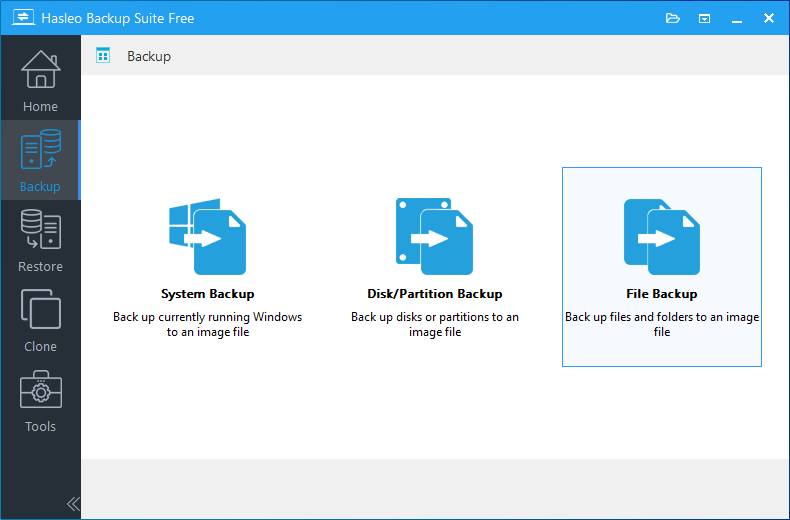
Step 1. Download, install, and run Hasleo Backup Suite. Click the "Backup" button in the navigation bar, then select "File Backup" in the operation area.
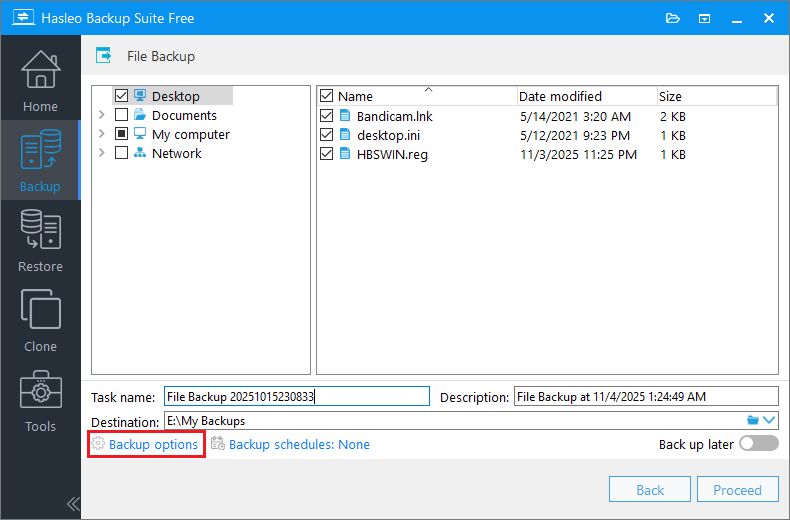
Step 2. Select the files/folders to backup, then customize the task name and description. Set the destination to OneDrive's local sync folder (typically located at C:\Users\Username\OneDrive\). Please ensure OneDrive's "Sync Folder" feature is enabled. Click Backup Options to further configure compression levels, encryption, and other settings to protect your sensitive data.
💡Tips:
- Task name: Specify a task name so that you can quickly find and manage your backup task later.
- Description: Briefly describe the purpose of the task and any other relevant information.
- Destination: Modify the destination path where the backup image files will be stored by clicking the folder icon.
- Backup options: Advanced backup settings. For more details, please refer to Backup options.
- Backup schedule: Set up backup schedules to automatically perform your backup tasks on a regular basis. For more details, please refer to Backup schedule.
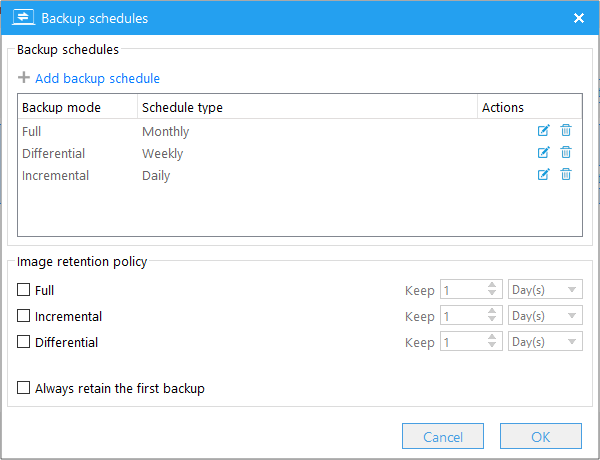
Step 3. Click Backup Schedules to configure automated backups. You can set up different schedules (e.g., daily, weekly, monthly) according to your needs.
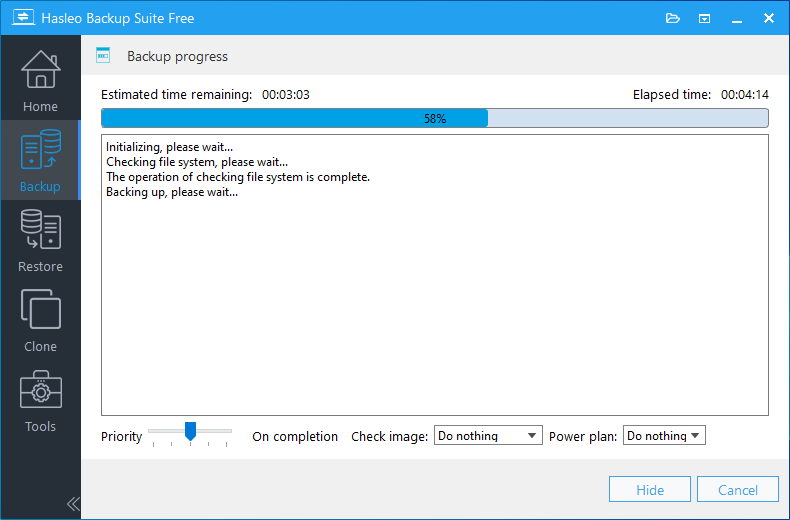
Step 4. After configuration is complete, click "Continue" and Hasleo Backup Suite will start backing up to your specified OneDrive local sync folder. OneDrive automatically detects new files (backup files) in this folder and uploads them to cloud servers in the background.
Step 5. Return to the main "Backup" interface, click "File Backup", and select the same source files or folders. Set the destination to a local external hard drive. Configure backup options and schedules as needed, then click "Continue" to start the backup. With this setup, your data now has triple protection: the original (1), a backup on an external drive (2), and a copy in OneDrive (3), fully implementing the 3-2-1 backup rule.
💡Tips:
- Regularly test whether your backup files can be successfully restored. This is the most important and reliable method to verify backup effectiveness.
- Ensure external hard drives and OneDrive have sufficient storage space.
- Keep encryption passwords in a safe place.
Frequently Asked Questions
A: The 3-2-1 backup rule means: maintain 3 copies of your data, store them on 2 different types of media, and keep 1 copy offsite. This strategy ensures data protection against various failure scenarios.
A: Yes, the 3 copies include your original data plus 2 backup copies. So you need to create at least 2 backup copies of your important data to meet the 3-copy requirement.
A: Examples include: internal HDD + external HDD, internal SSD + USB flash drive, NAS + cloud storage, or any combination of two different storage types to reduce simultaneous failure risks.
A: Yes, cloud storage (like OneDrive, Google Drive, iCloud) is considered an offsite backup because the data is stored on servers in different geographic locations, protecting against local disasters.
A: Backup frequency depends on data change rate. Critical business data may need daily backups, while personal files might need weekly or monthly backups. Hasleo Backup Suite allows you to set automated schedules.
A: The 3-2-1 rule helps against ransomware, but additional measures are recommended: use immutable backups (write-once storage), regularly test backup restoration, and keep at least one backup offline or air-gapped.
A: You need storage capacity equal to at least 2 copies of your data (for the 2 backup copies). For example, if you have 500GB of important data, you need at least 1TB of total backup storage capacity.
Conclusion
After mastering the 3-2-1 backup principle and learning to use Hasleo Backup Suite, following these best practices will make your data protection system more reliable.
Backup Strategy Recommendations:
| Data Category | Backup Frequency | Retain Policy | Notes |
| Operating System | Monthly/Major Updates | Last 3-5 images | Enables rapid full-system recovery in case of failure. |
| Personal Documents | Daily/Weekly | Last 5-10 versions | Keep multiple recent versions to prevent accidental deletion or modification. |
| Photos and Videos | Monthly/Quarterly | Long-term, multiple versions | Irreplaceable assets should be archived long-term on multiple, geographically separate media, with periodic integrity checks. |
Data backup is a fundamental measure for protecting personal and enterprise assets in the digital age. The 3-2-1 backup principle provides a solid strategic framework, and professional tools like Hasleo Backup Suite makes implementation simple and efficient. Take action to implement and maintain this strategy to ensure comprehensive protection of your valuable data.


