

- Overview of WMI
- Brief introduction to Hasleo Backup Suite
- How to Repair WMI Issues Using Hasleo Backup Suite?
- Frequently Asked Questions
- Summary
When Windows Management Instrumentation (WMI) fails, the system's key information cannot be accessed, which may cause interruptions or failures in data protection operations. This guide will explain how to use Hasleo Backup Suite to fix WMI issues.
Overview of WMI
Windows Management Instrumentation (WMI) is the infrastructure used for managing management data and operations on Windows-based operating systems. Through WMI, developers can write code to obtain various management information about the operating system, software applications, hardware devices, and more. Many system functions and third-party software rely on WMI to perform system status queries, hardware detection, and various management tasks. If WMI is corrupted, it may cause system management functions to malfunction, such as failures in critical operations like backup and restore.
Hasleo Backup Suite, like many third-party Windows applications, relies on WMI to query system and hardware information. Therefore, when WMI is not functioning properly, Hasleo Backup Suite will also be affected. Fixing WMI is the most effective way to resolve such issues.
Brief introduction to Hasleo Backup Suite👑
As a professional backup software, Hasleo Backup Suite integrates data backup, disk cloning, and system restore functions, and is fully compatible with the Windows operating system. Its built-in "Repair WMI" tool can effectively fix common WMI issues, ensuring the stable operation of Hasleo Backup Suite.
Beyond core backup, restore, and clone functions, Hasleo Backup Suite also integrates a variety of efficient and practical features, such as:
- Repair VSS: Fix common VSS service issues to ensure uccessful backup operations.
- Rebuild MBR: Repair the MBR to fix boot failures.
- Add Boot Menu: Enable this feature to enter the recovery environment even without a bootable medium, allowing emergency system recovery.
- Emergency Disk: Allows users to create a personalized WinPE bootable disk for system maintenance and repair.
- Wipe Drive: Permanently erase all data on the selected drive to prevent data leakage.
- And More: Check Image, PXE Server...
How to Repair WMI Issues Using Hasleo Backup Suite?
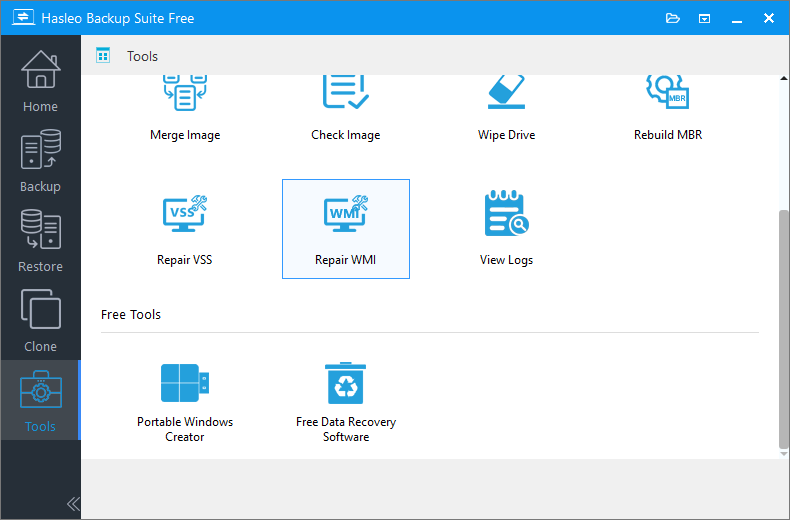
Step 1. Download, install, and run Hasleo Backup Suite. Click the "Tools" button in the navigation bar, then choose "Repair WMI" in the action area.
Step 2. Hasleo Backup Suite is now repairing the MBR. Please wait for the process to complete. This may take a few moments.
Frequently Asked Questions
A: WMI (Windows Management Instrumentation) is Windows' core management infrastructure. Hasleo Backup Suite relies on WMI to query system and hardware information. When WMI is corrupted, backup and restore operations may fail.
A: Common signs include error messages when launching Hasleo Backup Suite, failure to retrieve system information, backup tasks not starting, or the Repair WMI tool showing errors.
A: Usually a few minutes. The process scans and rebuilds WMI repository, which may take longer on systems with extensive corruption.
A: No. Repair WMI only fixes the Windows Management Instrumentation service—it does not modify or delete any backup images.
A: Yes, restarting is recommended to ensure all WMI components load correctly after repair.
A: Yes. The Repair WMI tool in Hasleo Backup Suite works on all Windows editions including Home, Professional, and Enterprise.
A: Try running the tool again as administrator, or use Windows built-in System File Checker (sfc /scannow) to repair corrupted system files. Contact support if the problem persists.
A: Yes. The repair process only rebuilds the WMI repository and does not affect user data or system settings. It's safe for production environments.
Summary
By following the methods above, you can use Hasleo Backup Suite to resolve WMI errors. Beyond Repair WMI, Hasleo offers a full set of data protection tools—including backup, system restore, and disk cloning—making it a comprehensive solution for safeguarding your system and data.


