- What is a BitLocker Startup Key?
- Difference Between BitLocker Startup Key and Recovery Key
- Why Do You Need to Export and Backup BitLocker Startup Key?
- Why Can't You Export BitLocker Startup Key in Windows Home?
- Overview of Hasleo BitLocker Anywhere
- How to Export BitLocker Startup Key Using Hasleo BitLocker Anywhere
- BitLocker Startup Key Usage Precautions
- Frequently Asked Questions (FAQ) for Exporting BitLocker Startup Key
- Conclusion
When encrypting the Windows boot partition (the partition containing the Windows directory, usually C:) with BitLocker, you can choose to start Windows using either a BitLocker password or a startup key. The startup key is a file with the .BEK extension, typically stored on a USB device, used to start the system directly without entering a password or recovery key. Note that if the BitLocker startup key is lost, it cannot be retrieved by default, as Windows itself does not provide a function to export this key.
However, Hasleo BitLocker Anywhere fills this gap. It supports exporting the startup key (.BEK file) from encrypted drives, provided you have the correct BitLocker recovery key. This article will introduce the specific usage of this feature.
What is a BitLocker Startup Key?
A BitLocker Startup Key is a special key file used to automatically unlock a BitLocker encrypted system drive during computer startup. Unlike entering a password manually, the startup key allows you to store the key file on a USB drive for automatic authentication during Windows startup.
🎯Main characteristics:
- File format: The startup key is stored as a file with .BEK extension, containing the encryption key used to decrypt the drive.
- USB storage: Must be stored on a USB flash drive or other removable storage device
- Automatic unlock: During startup, simply insert the USB drive containing the startup key, and the system automatically reads and verifies it without user interaction.
- No TPM dependency: The startup key can serve as a BitLocker encryption solution for devices without a TPM chip (requires enabling via Group Policy).
🔥Difference Between BitLocker Startup Key and Recovery Key
BitLocker provides two types of backup authentication methods: startup key and recovery key. Each has different uses and scenarios:
| Comparison Item | Startup Key | Recovery Key |
|---|---|---|
| File/Data Format | .BEK key file | 48-digit numeric code |
| Typical Storage Medium | USB drive | Printable or save as text file |
| Core Usage Scenario | Automatic unlock during daily startup | Backup unlock method in emergencies |
| Usage Frequency | Used every time during startup | Used during fault recovery |
| TPM Requirement | Can replace TPM | Can bypass TPM |
Why Do You Need to Export and Backup BitLocker Startup Key?
Backing up the BitLocker startup key is crucial for ensuring secure system access:
👍Convenient Startup
- Avoid remembering passwords: Save the startup key on a USB device; when inserted, the system can automatically unlock without entering a complex BitLocker password each time.
- Automation scenarios: Suitable for servers, industrial computers, public terminals with frequent restarts, and other environments requiring unattended or quick startup.
- No-TPM environment: On computers without a TPM chip, the startup key is the main method to achieve automatic disk unlock at startup.
🛠️Fault Recovery
- Multi-key protection: Create multiple copies of the startup key stored on different USB devices or secure locations to reduce single point of failure risk.
- TPM failure or hardware changes: When the TPM module is damaged, motherboard is replaced, BIOS is updated, or boot configuration changes, the startup key can serve as a backup unlock method to prevent the system from being locked.
Why Can't You Export BitLocker Startup Key in Windows Home?
In Windows Professional or Enterprise editions, users can easily export the startup key through the BitLocker Drive Encryption management interface. However, in Windows Home editions, Microsoft does not provide a direct function to export the startup key.
📌The main reasons are as follows:
- Feature limitations: Microsoft reserves complete BitLocker Drive Encryption (including advanced features like key management and Group Policy) for Professional and Enterprise editions, primarily targeting enterprise users with IT management needs.
- Simplified user experience: For most average home users, there is rarely a need to manually export the recovery key during daily use. Microsoft prefers to guide home users to automatically back up recovery keys to their Microsoft account.
- Security risk assessment: Microsoft may believe that home users, compared to enterprise IT administrators, are more likely to cause security issues by losing USB drives.
The solution is to use the third-party tool - Hasleo BitLocker Anywhere, which allows you to easily export the startup key in Windows Home editions.
Overview of Hasleo BitLocker Anywhere
Hasleo BitLocker Anywhere is the world's first third-party encryption solution specifically designed for Windows versions that do not natively integrate BitLocker functionality (such as Windows Home editions). Besides supporting drive encryption and decryption, it also provides enterprise-level features such as startup key export, recovery key backup, and password management.
Features supporting startup key export:
- ✅ Full version compatibility: Fully supports Windows 11/10/8.1/8/7 Home, Professional, Enterprise, and Server editions.
- ✅ Easy to use: Provides a graphical interface; only a few steps needed to complete the startup key export.
- ✅ Security guarantee: Exporting the startup key requires authentication via the recovery key, ensuring only authorized users can perform this operation.
- ✅ Multiple USB support: Supports saving the startup key (.BEK file) to any available USB drive.



How to Export BitLocker Startup Key Using Hasleo BitLocker Anywhere
Step 1: Download and Install Hasleo BitLocker Anywhere
Visit the official website of Hasleo BitLocker Anywhere, download the latest version of Hasleo BitLocker Anywhere for Windows, and follow the installation wizard to complete the installation.
Step 2: Launch the Program and Select the Drive
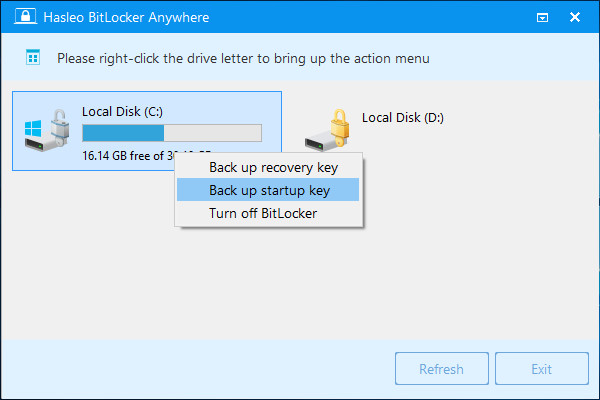
Launch Hasleo BitLocker Anywhere. In the main interface, locate the BitLocker-encrypted system drive (marked with a lock icon) from which you want to export the startup key. Right-click the drive and select "Back up Startup Key" from the context menu.
Step 3: Enter BitLocker Recovery Key
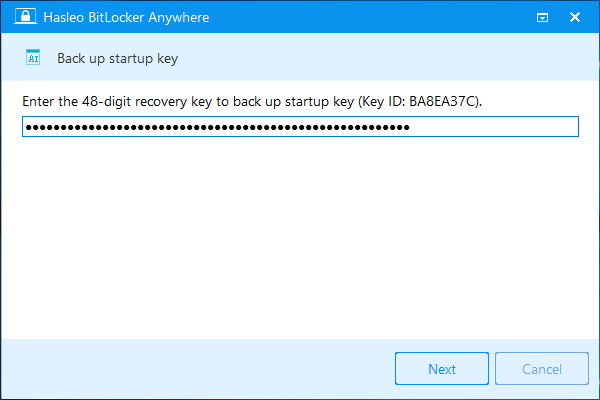
In the popup window, enter the recovery key (48 digits) for this BitLocker encrypted drive, then click the "Next" button to continue.
Step 4: Select USB Drive to Save Startup Key
Select an available USB drive to save the startup key file (.BEK format), then click the "Save" button to complete the backup.
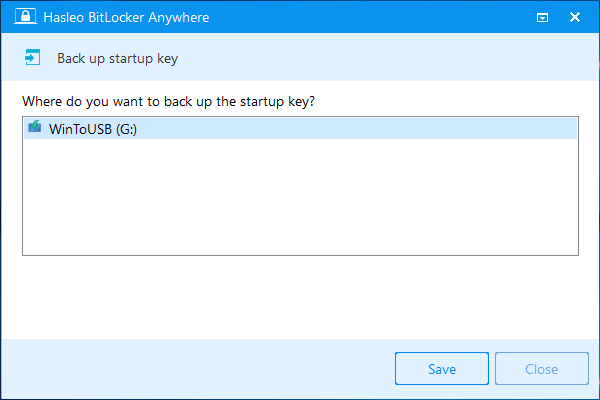
⚠️Tips: Please make sure to select the correct USB drive, because the startup key file will be saved to the root directory of that drive. After the backup is complete, please keep the USB drive properly secured and never lose it.
⭐BitLocker Startup Key Usage Precautions
After successfully exporting the startup key (.BEK file), please follow the suggestions below to properly use and manage it, ensuring data accessibility.
Correct Startup Key Usage
- Insert before startup: When the BitLocker unlock prompt appears on screen during computer startup, insert the USB drive containing the startup key.
- Automatic verification: The system will automatically detect the .BEK key file in the root directory of the USB drive and complete authentication; no manual file selection is needed.
- Remove after startup: The startup key is only needed during the boot process. After the operating system is fully loaded, the USB drive can be safely removed.
Backup Strategy Recommendations
- Multiple copies: Recommended to create 2-3 different USB drives with startup key copies.
- Off-site storage: Keep at least one copy stored off-site to avoid single points of failure such as fire or theft.
- Regular testing: Every few months, actually insert the USB drive and restart the computer to verify the key is still recognized.
- Label marking: Clearly label the USB drive to avoid accidental formatting or confusion with other storage devices.
Frequently Asked Questions (FAQ) for Exporting BitLocker Startup Key
A: A BitLocker Startup Key is a .BEK file stored on a USB flash drive that automatically unlocks a BitLocker-encrypted system partition during computer startup without requiring a password.
A: Yes, you can export the BitLocker Startup Key using Hasleo BitLocker Anywhere as long as you have the BitLocker recovery key. Without the recovery key, you cannot retrieve the startup key.
A: Yes, you must provide the BitLocker recovery key to export the startup key. This is a security measure to ensure only authorized users can export the key.
A: No, Windows Home editions do not include the ability to export BitLocker startup keys. You need Hasleo BitLocker Anywhere to export startup keys in Windows Home.
A: Store the startup key on a separate USB drive in a safe location. Keep it separate from the recovery key and label the USB drive clearly to avoid accidental formatting.
A: No, you can only have one active startup key per drive at a time. If you export a new startup key, it will replace the existing one.
A: If you lose both keys, you will not be able to access the encrypted drive.
A: No, the startup key is tied to the specific drive it was created for. You cannot use it to unlock BitLocker-encrypted drives on other computers.
Conclusion
Through this tutorial, you have learned how to export BitLocker startup key using Hasleo BitLocker Anywhere in Windows. The startup key is a convenient authentication method that replaces manual password entry, especially suitable for users who need to frequently power on/off, don't have TPM chips, or want to simplify the startup process.
As a professional BitLocker solution, Hasleo BitLocker Anywhere not only supports exporting startup keys but also provides features such as backing up BitLocker recovery keys, changing BitLocker passwords, locking BitLocker drives, and more. It is the best choice for Windows Home users to manage BitLocker encryption.