

- Overview of Both Software
- Feature and Price Comparison
- Why Choose Hasleo Data Recovery?
- How to Efficiently Recover Lost Data Using Hasleo Data Recovery?
- Frequently Asked Questions
- Conclusion
In daily life and work, data loss can occur at any time - whether it's accidental deletion, formatting, system crash, or virus attack. When important files disappear, it often leaves people feeling helpless. At this point, an efficient and reliable data recovery software becomes the key tool to recover lost data. Currently, there are many data recovery software options available on the market. Among them, Hasleo Data Recovery and AOMEI FastRecovery have attracted considerable attention from users due to their ease of use and recovery capabilities. This article will provide a comprehensive comparative analysis from multiple dimensions to help you make a more suitable choice based on your actual needs.
Overview of Both Software
Hasleo Data Recovery
Hasleo Data Recovery is a data recovery software designed for Windows systems, dedicated to helping users efficiently retrieve files lost due to deletion, formatting, virus attacks, and other reasons. Whether it's hard drives, external hard drives, USB flash drives, or SD cards and other common storage media, this software provides comprehensive support. Its most outstanding feature is its support for data recovery from BitLocker encrypted drives, which sets it apart from many other data recovery tools. Moreover, it supports creating WinPE bootable rescue disks, enabling data recovery even when the system crashes.
Hasleo Data Recovery offers three core recovery modes to address different types of data loss scenarios:
- Deleted File Recovery: Suitable for recovering accidentally deleted files or files emptied from the Recycle Bin. Simple operation with fast recovery speed.
- Deep Scan Recovery: Designed for complex situations such as formatting, partition loss, or file system corruption. It scans underlying data to recover lost files as much as possible.
- BitLocker Data Recovery: Specifically designed for BitLocker encrypted drives. It can directly scan and recover data even when unlocking or decryption fails, ensuring data security in encrypted storage.
Whether it's everyday accidental file deletion or serious data loss caused by system crashes or virus attacks, Hasleo Data Recovery can provide reliable technical support. Its user-friendly interface and clear recovery wizard make it easy for non-professional users to get started and quickly recover important files.
AOMEI FastRecovery
AOMEI FastRecovery is a data recovery software launched by AOMEI, also a data recovery tool for Windows systems that helps users recover lost files from various storage devices. The software supports recovering multiple file formats to meet different users' data recovery needs. Its interface design is intuitive and user-friendly with simple operations.
AOMEI FastRecovery offers quick scan and deep scan modes. In terms of recovery types, the software covers two main modules: hard drive recovery and USB/SD card recovery. It also supports partition loss recovery and data recovery after system crashes. However, the software has a relatively high cost, and careful consideration is recommended before use. Its subscription price starts at $39.95 per month, which can be costly for regular users in the long run.

Feature and Price Comparison
Feature Comparison
| Feature | Hasleo Data Recovery👑 | AOMEI FastRecovery |
|---|---|---|
| Deleted File Recovery | ✓ Supported | ✓ Supported |
| Deep Scan Recovery | ✓ Supported (Sector-by-sector) | ✓ Supported |
| BitLocker Data Recovery | ✓ Supported | ✕ Not Supported |
| RAW Drive Recovery | ✓ Supported | Only DWG and TIF formats |
| Partition Loss Recovery | ✓ Supported | ✓ Supported |
| Recovery After System Crash | ✓ Supported | ✓ Supported |
| BitLocker To Go Recovery | ✓ Supported | ✕ Not Supported |
| Supported File Systems | FAT12/16/32, exFAT, NTFS, HFS+, etc. | FAT, exFAT, NTFS, etc. |
| Free Edition | ✓ Supported (2GB limit) | ✕ Not Supported |
| Preview Function | ✓ Supported | ✓ Supported |
| Export Scan Results | ✓ Supported | ✕ Not Supported |
Price Comparison
| Edition | Hasleo Data Recovery | AOMEI FastRecovery (Subscription) |
|---|---|---|
| Free Edition | Free (2GB limit) | No free edition |
| Professional | $49 (Lifetime free upgrades) | $39.95/month |
| Ultimate | $169 (BitLocker Data Recovery) | No Ultimate edition |
| Technician | $299 (Unlimited PCs) | $99/month |
🎯Why Choose Hasleo Data Recovery?
Based on the above comparison, it is clear that Hasleo Data Recovery performs exceptionally well in terms of price, features, and operational convenience. It not only provides a highly competitive free version to meet the data recovery needs of basic users, but also maintains a high cost-performance ratio in its paid versions, truly achieving a balance between powerful features and controllable costs. Here are its main advantages:
Support for BitLocker Encrypted Drive Recovery
This is the unique advantage of Hasleo Data Recovery. With the widespread use of BitLocker encryption in enterprise environments and personal privacy protection, Hasleo Data Recovery can effectively handle data recovery needs for BitLocker encrypted storage devices. Whether your BitLocker encrypted drive is in a healthy state, inaccessible, formatted, deleted, damaged, failed, or lost, it can efficiently complete file recovery tasks.
Powerful File System Support
Hasleo Data Recovery supports multiple file systems including FAT12/16/32, exFAT, NTFS, and HFS+. Among these, the HFS+ file system is particularly important for Mac users. If you need to share data between Windows and Mac systems, Hasleo Data Recovery can easily read data from HFS+ partitions.
Free Recovery Capacity
The free version of Hasleo Data Recovery provides up to 2GB of data recovery capacity, which is very practical for users who only need to occasionally recover a small amount of files. Whether it's accidentally deleted documents, lost photos, or regretting after emptying the Recycle Bin, this tool can help you recover important data without paying.
Wide Compatibility with Storage Devices
Hasleo Data Recovery supports data recovery from various storage devices, including hard drives, solid-state drives (SSDs), USB drives, memory cards, and more. Whether it's data loss caused by accidental deletion, formatting, partition loss, system crashes, or virus attacks, the software can provide efficient and secure data recovery solutions.
Scan Results Export Function
Hasleo Data Recovery supports exporting scan results, which means you can save the current scan data after the first scan is complete, and then load and continue the recovery operation at your convenience. This design is particularly useful when dealing with larger capacity hard drives, avoiding time waste from repeated scans and improving overall file recovery efficiency.
Wide System Support
Hasleo Data Recovery not only fully supports Windows desktop operating systems but also is compatible with Windows Server series, meeting the data recovery needs of enterprise users and professional IT personnel in server environments.
Technician Version Available
Hasleo Data Recovery offers a Technician version that allows use on unlimited PCs, supporting data recovery services for your clients. It is an ideal choice for technicians and businesses.
User-Friendly Design
Hasleo Data Recovery has a simple and intuitive operating interface. Users can easily get started without professional technical backgrounds. The built-in preview function allows users to confirm whether files are intact and readable before recovering them, enabling more targeted recovery and avoiding ineffective operations.

How to Efficiently Recover Lost Data Using Hasleo Data Recovery?
Before using Hasleo Data Recovery, the most critical step when you discover file loss is: immediately stop all write operations to that disk. Please do not install the recovery software on the disk where data loss occurred, and do not save recovered files back to the original drive. This is because newly written data may easily overwrite the original file content you are trying to recover. Once overwritten, the success rate of recovery will be significantly reduced, or may even result in permanent loss.
Step 1. Download, install, and run Hasleo Data Recovery. On the main interface, you will see three recovery modes. Select the data recovery mode according to your needs.
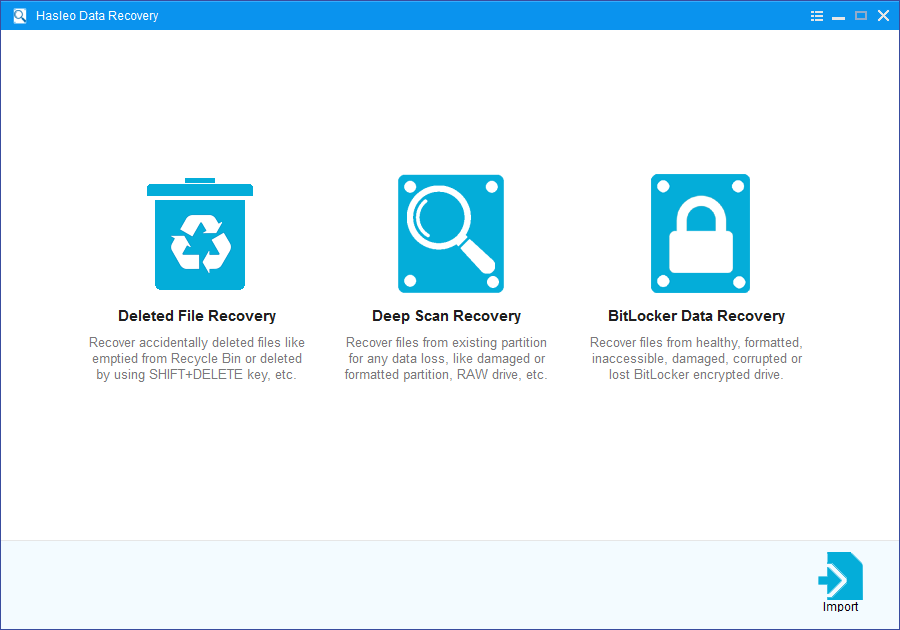
- Deleted File Recovery: This recovery mode will quickly scan your device to find deleted or recently lost files within a short time, typically completing in just minutes. So we strongly recommend that you try it first. If your desired files aren't found, please try "Deep Scan Recovery" to find more lost files.
- Deep Scan Recovery: This mode will deeply scan your device with advanced algorithms to find every recoverable file. It performs sector-by-sector scanning, so it will take longer but delivers significantly more results.
- BitLocker Data Recovery: This mode is specifically designed for Windows BitLocker encrypted drives. It can recover deleted or lost files from drives that are healthy, inaccessible, failed, damaged, corrupted, deleted, or lost. (A password or 48-digit recovery key is required.)
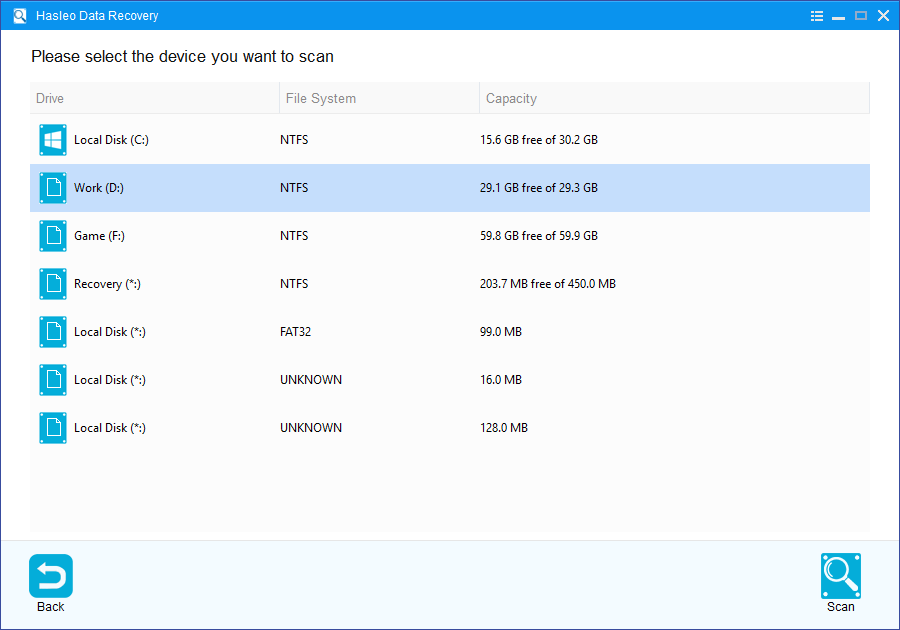
Step 2. Please select the hard drive or partition where you lost your data, then click the "Scan" button to start scanning.
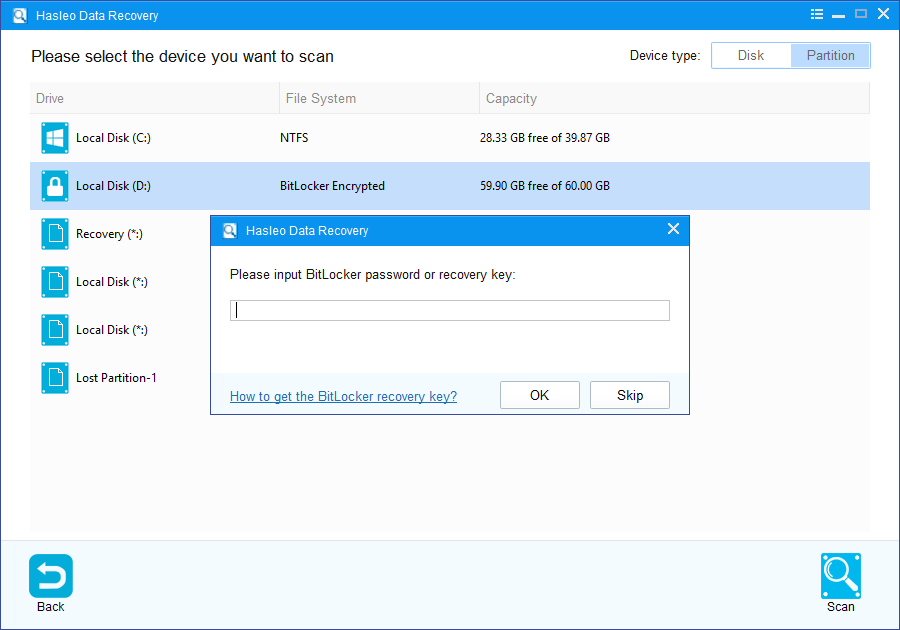
If you selected the BitLocker recovery mode, the system will prompt you to enter the BitLocker password or 48-digit recovery key.
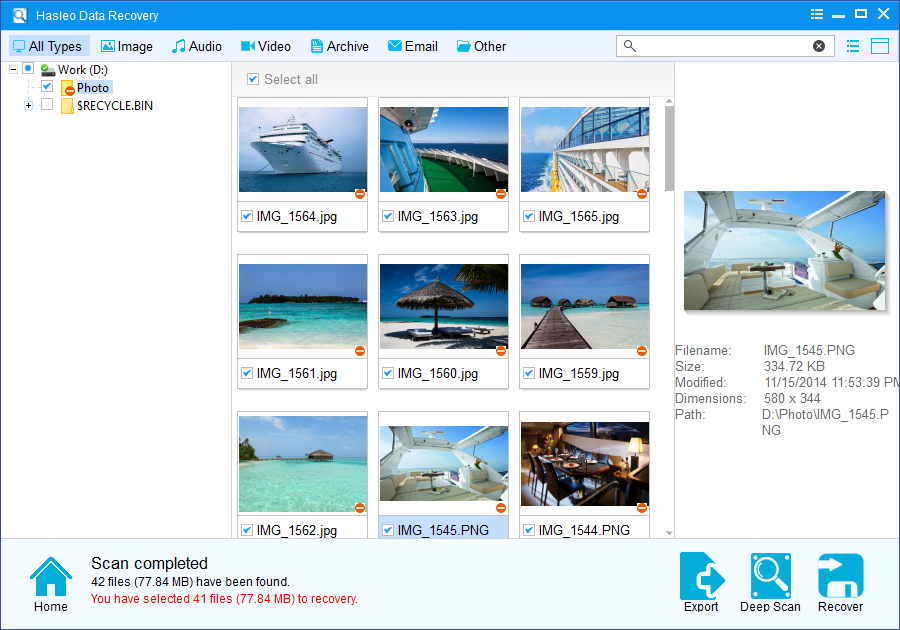
Step 3. After scanning completes, all found files will be displayed in the interface. You can quickly locate target files by path and file types. Before recovery, you can preview images, documents, videos, and other files. Select the files you want to recover, then click the "Recover" button.
⚠️Tips:
- If "Deleted File Recovery" does not locate your files, please click "Deep Scan" to start "Deep Scan Recovery". This process takes longer but can recover significantly more lost data.
- If your device is encrypted with BitLocker Drive Encryption, use the "BitLocker Data Recovery" feature instead.
- Do not save recovered files to the original device where data loss occurred, as this may overwrite the lost data.
- You can export or save scan results for later use or future recovery sessions.
🔥Frequently Asked Questions (FAQ)
A: Yes, Hasleo Data Recovery offers a free version with a 2GB data recovery limit. This is sufficient for users who only need to recover a small amount of occasionally lost files. If you need to recover more than 2GB, you can upgrade to the Professional, Ultimate, or Technician version.
A: Hasleo Data Recovery has several advantages over AOMEI FastRecovery: it supports BitLocker encrypted drive recovery (AOMEI doesn't), offers a free version with 2GB recovery capacity (AOMEI has no free version), provides lifetime updates for a one-time payment ($49 vs AOMEI's $39.95/month subscription), and supports HFS+ file system for Mac users.
A: Yes, Hasleo Data Recovery has a dedicated BitLocker Data Recovery mode that can recover data from BitLocker encrypted drives. You need to provide the password or 48-digit recovery key. It can handle scenarios like healthy, inaccessible, formatted, deleted, damaged, or failed BitLocker drives.
A: Hasleo Data Recovery supports multiple file systems including FAT12/16/32, exFAT, NTFS, and HFS+. The HFS+ support is particularly useful for Mac users who need to share data between Windows and Mac systems.
A: The Professional and Ultimate versions are for single PC use. If you need to use it on multiple computers or provide data recovery services to clients, you can choose the Technician version which allows unlimited PC usage.
Conclusion
Based on comprehensive comparisons, Hasleo Data Recovery demonstrates significant advantages in terms of feature completeness, BitLocker encrypted drive support, and free version recovery capacity. Especially for users using BitLocker encryption mechanism, Hasleo Data Recovery is undoubtedly the most ideal choice. It can not only complete conventional data recovery tasks but also effectively help users recover lost data from BitLocker encrypted drives, building a comprehensive and multi-layered protection barrier for users' data assets.
We strongly recommend that you choose Hasleo Data Recovery as your preferred data recovery tool. It not only performs excellently in technology and offers comprehensive features, but also has reasonable pricing, providing solid and reliable protection for your valuable data assets. Whether you need to deal with unexpected everyday data loss or face complex challenges of encrypted drive data recovery, Hasleo Data Recovery will be your most trustworthy data security guardian.
Related Articles
- How to Recover Deleted Files from Hard Drive or Removable Drive?
- How to Recover Lost Data from Damaged, Formatted, or RAW Drives?
- How to Recover Deleted/Lost Files from BitLocker Encrypted Drive?
- How to Recover Deleted or Lost BitLocker Encrypted Partition?
- How to Recover Data from Accidentally Formatted BitLocker Encrypted Drive?


