

- Overview of EaseUS Todo Backup Free
- The Best Free Alternative to EaseUS Todo Backup Free - Hasleo Backup Suite Free
- How to Back Up Windows 11/10/8/7 Using Hasleo Backup Suite Free
- Frequently Asked Questions
- Summary
In the digital information era, data security has become a core need that users cannot ignore. For individual users, choosing reliable and efficient free backup software is crucial. EaseUS Todo Backup Free has accumulated a wide user base due to its ease of use and stable performance. However, as the demand for data protection continues to evolve, Hasleo Backup Suite Free, with its more comprehensive features and superior performance, has emerged as the best alternative to EaseUS Todo Backup Free.
Overview of EaseUS Todo Backup Free
EaseUS Todo Backup Free is stable and user-friendly backup software for Windows. It supports backing up the Windows operating system, disks/partitions, and important files, effectively preventing data loss caused by system crashes, virus attacks, or hardware failures. Its features can meet the daily data protection needs of most users, but there are still some limitations during use. The details are as follows:
Pros:
- Supports backup and restoration of systems, disks/partitions, and files.
- Supports the creation of WinPE emergency disks, as well as encryption and image retention policy features.
- Offers fast backup and restore speed while maintaining low system resource consumption.
- Compatible with all versions from Windows 7 through Windows 11.
- User-friendly interface
Cons:
- It does not provide cloning.
- It does not provide file filter or image splitting.
- It does not provide compression and quick recovery technologies.
- It is not compatible with the ARM64 architecture.
- It has too many pop-up ads.
The Best Free Alternative to EaseUS Todo Backup Free - Hasleo Backup Suite Free
Hasleo Backup Suite Free is a professional-grade tool that delivers the core backup, restore, and cloning capabilities users expect, alongside exceptional performance that earns high praise. This integrated solution makes it an efficient all-in-one choice for Windows data management. Below, we detail its key features.
- Comprehensive and powerful: Its backup and restore features let you create system images effortlessly and recover from crashes instantly, while the cloning function promotes seamless data migration.
- Advanced technology and excellent performance: Compatible with all Windows PCs and servers, it supports Windows x86/x64 and ARM64 architectures. It boots in both UEFI and Legacy BIOS modes, ensures safe and stable program running, and operates with high efficiency and low power consumption.
- Multiple backup modes: It supports full, incremental and differential backups. Following an initial full backup, both incremental and differential backups save time and storage space by only copying the data that has changed.
- Features compression and encryption: It allows you to compress backup images to save disk space and encrypt them to protect your important data.
- Practical Toolbox: Here you can access advanced features like creating a WinPE emergency disk, merging backup images, and securely wiping disks.
- Intuitive and user-friendly interface: The interface design is clear, with the main functions immediately obvious, and guided prompts allow even beginners to get started quickly.
Through the following table, you can have a more intuitive understanding of the differences between the two software programs.
| Hasleo Backup Suite Free (Recommended) | EaseUS Todo Backup Free | |
| System Backup/Restore |  |
|
| Disk/Partition Backup and Restore | |
|
| File/Folder Backup and Restore | |
File Backup/Restore |
| Disk/Partition Clone | |
 |
| Differential Backup | |
|
| Incremental Backup | |
|
| Delta/Fast Restore | |
|
| Backup Schedule | |
|
| Image Retention Policy | |
|
| Encrypt Backup | |
|
| File Filter | |
|
| Compress Backup | |
|
| Split Backup Image | |
|
| Create WinPE Medium | |
|
| Support Windows ARM64 | |
|
| Technical Support | |
|
| Backup Speed | Faster | Fast |
| Restore Speed | Faster | Fast |
How to Back Up Windows 11/10/8/7 Using Hasleo Backup Suite Free
With Hasleo Backup Suite Free, you can back up your Windows system in as few as three simple steps. Its intuitive, wizard-style interface is very user-friendly and can clearly guide you through the entire process. The specific steps are as follows:
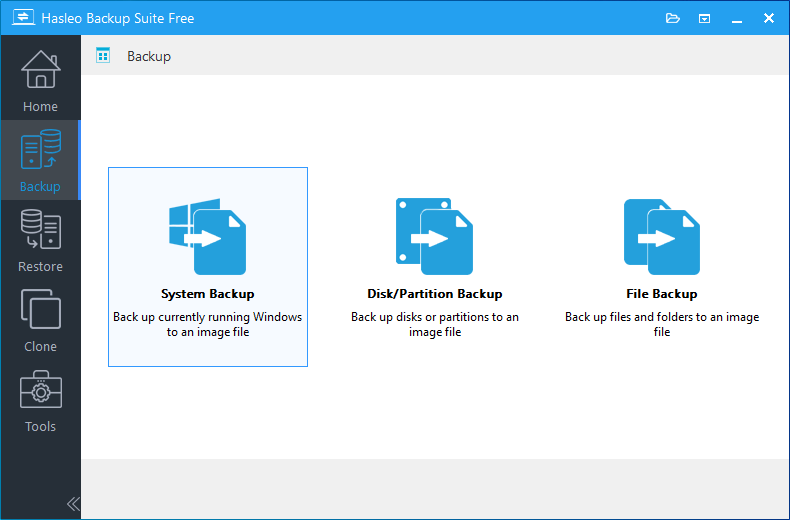
Step 1. Download, install, and run Hasleo Backup Suite Free. Click the "Backup" button in the navigation bar, then click "System Backup" button in the operation area.
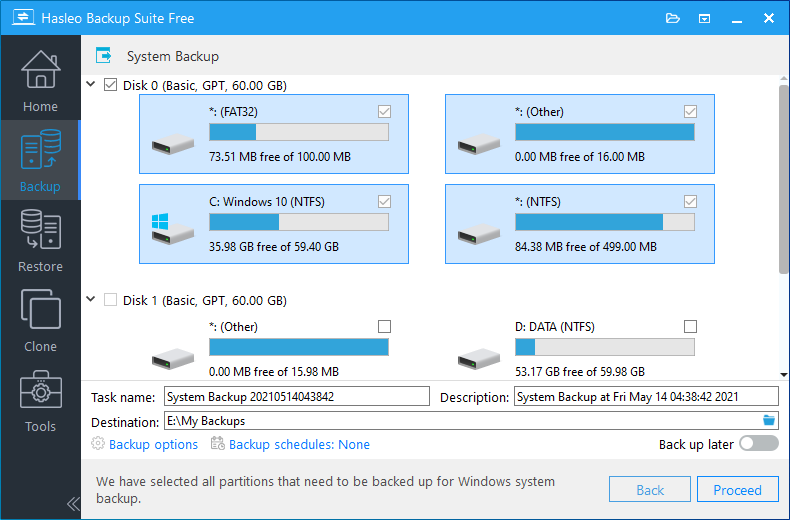
Step 2. Hasleo Backup Suite Free will automatically select all partitions required for a Windows 11/10/8/7 system backup. You only need to customize the task name, description, destination, and backup options as needed, then click the "Proceed" button.
* Tips:
- Task name: Specify a task name so that you can quickly find and manage your backup task later.
- Description: Briefly describe the purpose of the task and any other relevant information.
- Destination: Modify the destination path where the backup image files will be stored by clicking the folder icon.
- Backup options: Advanced backup settings. For more details, please refer to Backup options.
- Backup schedule: Set up backup schedules to automatically perform your backup tasks on a regular basis. For more details, please refer to Backup schedule.
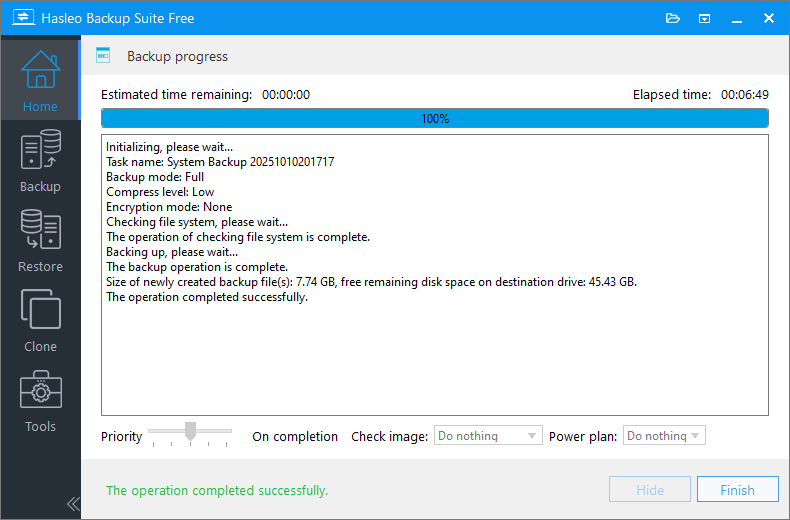
Step 3. After clicking the "Proceed" button, Hasleo Backup Suite Free will begin backing up your Windows operating system to the storage path you specify. Please note that the backup time depends on the size of the data that needs to be backed up; please be patient.
* Tips:
- Priority: Specify a priority for the backup process. A higher priority allocates more CPU time to the backup, which may cause other programs to run slower.
- Check image: Verify the integrity of the backup image files upon completion of the backup process.
- Power plan: Perform the power management action after the backup is complete.
Frequently Asked Questions
A: Hasleo Backup Suite Free is the best free alternative to EaseUS Todo Backup Free. It offers more features including disk/partition cloning, backup compression, file filtering, image splitting, and ARM64 support.
A: Yes, Hasleo Backup Suite Free supports Windows ARM64 architecture, while EaseUS Todo Backup Free does not support ARM64 devices.
A: Yes, Hasleo Backup Suite Free supports system, disk, and partition cloning. EaseUS Todo Backup Free does not provide cloning functionality in its free version.
A: Yes, Hasleo Backup Suite Free supports backup image compression to save disk space. EaseUS Todo Backup Free does not offer compression in its free version.
A: Yes, Hasleo Backup Suite Free supports splitting backup images into smaller files. EaseUS Todo Backup Free does not offer this feature.
A: No, Hasleo Backup Suite Free is completely ad-free, while EaseUS Todo Backup Free has too many pop-up ads that can disrupt user experience.
A: Yes, Hasleo Backup Suite Free supports file filtering to include or exclude specific file types during backup. EaseUS Todo Backup Free does not offer this feature.
A: Yes, Hasleo Backup Suite Free has faster backup and restore speeds compared to EaseUS Todo Backup Free, while maintaining low system resource consumption.
Summary
Hasleo Backup Suite Free is highly trusted by users for its comprehensive and practical features, stable and efficient performance, intuitive interface, and ad-free experience, making it the best alternative to EaseUS Todo Backup Free. For users who need a reliable, comprehensive, and free backup solution, Hasleo Backup Suite Free is the best choice. Download now for free and experience the full range of data protection this backup tool provides!
Related Articles
- How to Create Full/Differential/Incremental Backups in Windows Using Hasleo Backup Suite Free?
- How to back up and restore Windows 11 for free?
- How to Encrypt Backup Tasks Using Hasleo Backup Suite Free?
- Best Windows Server Backup and Restore Software in 2026
- How to Use the Deduplication in Hasleo Backup Suite to Save Storage Space?


